How to make a JavaScript site readable to ChatGPT and AI
Most AI crawlers fetch raw HTML and don't run JavaScript. Test what bots see, then ship content ChatGPT, Perplexity, and Claude can read. Free 0–100 scan.
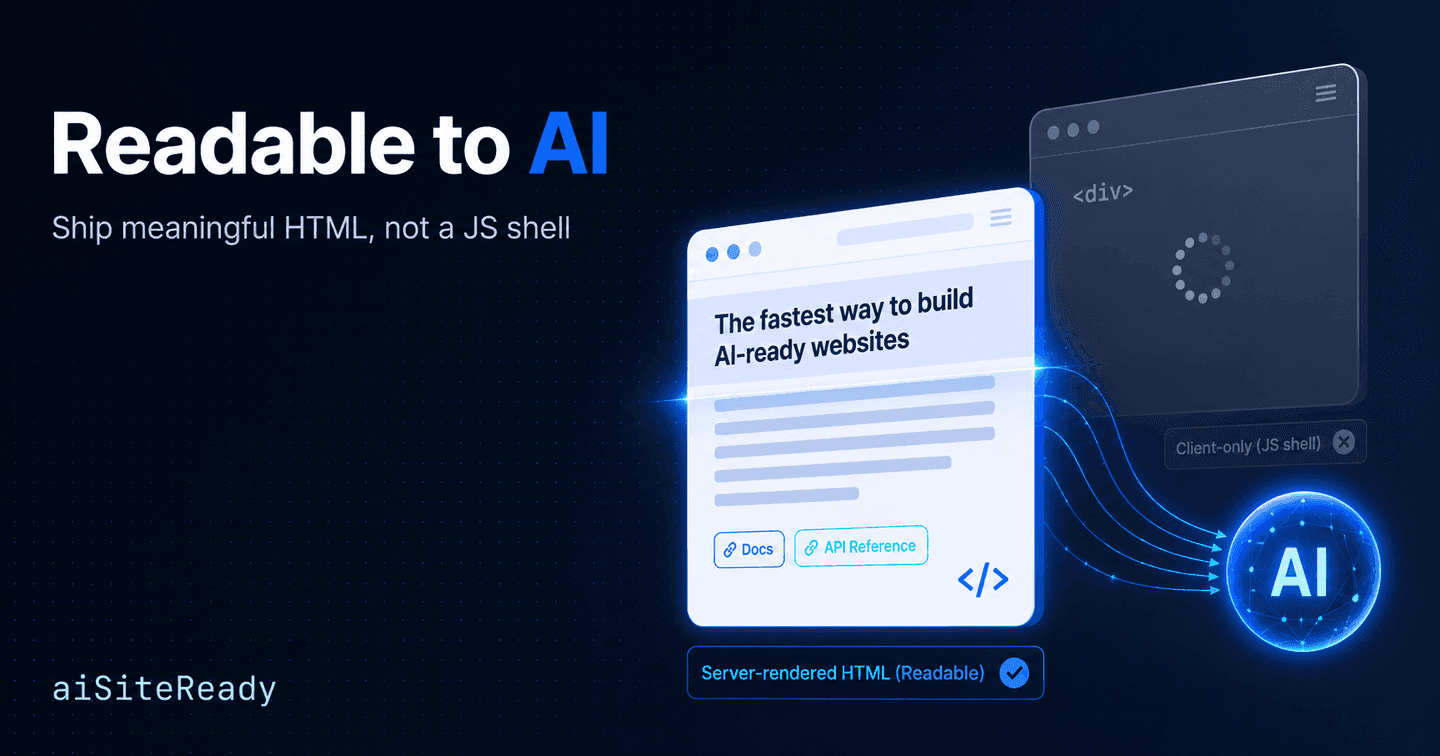
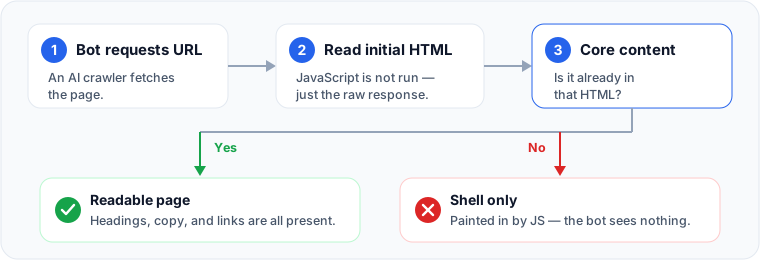
Most AI crawlers fetch your raw HTML and never run your JavaScript. So if your content is painted in by client-side scripts, an AI system can request your page and still see almost nothing. That is the whole problem in a nutshell. The fix is not a clever prompt or a special file. It is making sure the substance of the page exists in the first HTML response, before any bundle executes.
A useful way to hold this in your head is an order of operations. AI visibility is a content-delivery problem with three layers that must work in sequence. First, access: can a bot fetch the page at all? Then meaningful HTML: is the core content in that first response, without running JavaScript? Only then client-side interactivity: scripts that enhance a page that is already readable. Skip a layer and the ones above it stop mattering.
Key takeaways
- Many AI crawlers fetch raw HTML and do not execute JavaScript. Vercel observed OpenAI's GPTBot and OAI-SearchBot, Anthropic's ClaudeBot, and PerplexityBot fetching HTML without rendering it; Google's Gemini (via Googlebot) and AppleBot are exceptions (Vercel).
- Work in order: access → meaningful HTML → interactivity. Client JS should enhance an already-readable page, not create it.
- "Google can render it" is a weak standard. Googlebot is unusually capable, so passing Google's render is not proof other AI crawlers will see your content.
- The bots are not interchangeable. OAI-SearchBot is for ChatGPT search visibility, GPTBot is a training-crawl control, and ChatGPT-User is a user-triggered fetch, configured independently (OpenAI).
- You can reproduce what a bot sees with
curl, View Source, a JS-disabled reload, and headless snapshots. aiSiteReady automates the same checks and scores your site 0–100.
Does ChatGPT read JavaScript on your site?
The honest answer is: do not assume it does. OpenAI's public documentation describes its crawlers' identity, their robots.txt semantics, and their IP ranges, but it does not state whether those bots execute your site's JavaScript (OpenAI). When a vendor is silent on rendering, the safe engineering assumption is that rendering does not happen.
Independent measurement points the same way. When Vercel analyzed crawler behaviour on its network, OpenAI's GPTBot and OAI-SearchBot, Anthropic's ClaudeBot, and PerplexityBot all fetched HTML but did not render client-side JavaScript. Vercel even saw ChatGPT's crawler request JavaScript files in 11.5% of its fetches and Claude's in 23.8%. None of those bots executed that code (Vercel). Google's Gemini (through Googlebot) and AppleBot are the notable exceptions: they do render.
That last point matters more than it looks. Googlebot is unusually capable: it runs a recent version of Chromium. So "Google can see it" is a weaker standard than people assume. If your content only appears after a full, browser-grade render, it may still be invisible to the AI crawlers that increasingly feed answers in ChatGPT, Perplexity, and Claude. Common Crawl, whose archive trains and grounds many systems, removes all ambiguity: it fetches with HTTP GET, does not execute JavaScript, and does not use cookies (Common Crawl).
One distinction is worth getting right, because it is widely muddled: the OpenAI bots are not one thing. OAI-SearchBot surfaces your pages in ChatGPT search. GPTBot governs whether your content may be used for model training. ChatGPT-User fetches a page when a person explicitly asks ChatGPT to look at it (OpenAI). These are configured independently. If you want to appear in ChatGPT search, allow OAI-SearchBot; blocking GPTBot only opts you out of training and does not remove you from search (OpenAI Help Center). Anthropic and Perplexity publish the same kind of split between automatic crawlers and user-triggered fetchers (Anthropic, Perplexity).
Why can't AI read my website?
If a bot reaches your page but comes away with nothing, the cause is almost always one of these. Each one fails the "meaningful HTML" layer in a slightly different way.
- Client-only rendering. The first response is mostly an empty root element plus script tags, and the real content is assembled in the browser. A non-rendering crawler sees the shell and stops. web.dev contrasts this directly with server-sent HTML and notes the content-discovery downsides of building pages in the browser (web.dev).
- Lazy loading or infinite scroll for primary content. Google says Search does not scroll or click to reveal content, and recommends paginated URLs for infinite-scroll lists (Google). If even Google won't scroll to find your main copy, less-documented AI crawlers are a far riskier place to hide it.
- Blocked JS or CSS. If the resources needed to render are disallowed in
robots.txt, an engine that would render can't, and may misread the page (Google). - Content behind login, cookies, or a consent gate. For public discovery, assume crawlers are not authenticated and carry no cookies. Common Crawl literally doesn't (Common Crawl).
- Hydration mismatch. React expects the server-rendered and client-rendered markup to match; common causes like
Date.now(),Math.random(),windowbranches, or locale differences trigger a mismatch, after which React may discard the server HTML and regenerate the tree on the client (React). Your "HTML-first" story is only as stable as your hydration.
What do CSR, SSR, and prerendering actually send a bot?
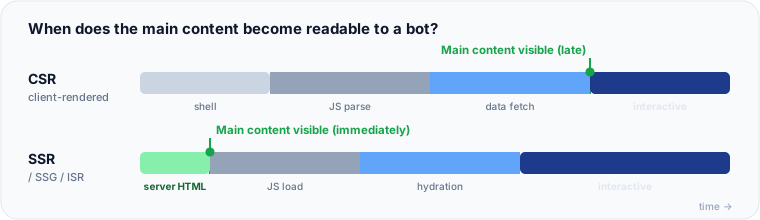
The mechanical question behind all of this is simple: what bytes come back in the first response, and how much work must a crawler still do before your content exists? The table below summarizes that, with practical readability ratings synthesized from framework and search-engine docs.
| Approach | What a no-JS bot sees | AI-readability |
|---|---|---|
| CSR (client-side SPA) | Usually just a shell: sparse markup or placeholders | Risky: primary text and links are JS-only |
| SSR + hydration | Full HTML on every request; content present immediately | Strong, if the server HTML truly contains the primary content |
| SSG (static generation) | Full HTML built ahead of time | Strong for stable public pages; excellent cacheability |
| ISR (incremental static) | Prerendered HTML, revalidated over time | Strong for large, periodically-fresh content sets |
| Islands / hybrid | Mostly static HTML; only widgets need JS | Often excellent for content-heavy sites |
| Prerender service | A rendered HTML snapshot served to bots | Good transitional fix; adds moving parts |
| Dynamic rendering | Bots get server HTML, users get the SPA | Works, but Google calls it a workaround, not a long-term architecture |
The single question that decides all of these is the same: can a crawler extract your page topic, heading hierarchy, main copy, important links, and media references from the initial HTML, without executing your bundle? If the answer is no, you are betting your visibility on a rendering pipeline you do not control.
How do you test what a bot sees?
You do not have to guess. This progression moves from the bluntest tool to search-engine confirmation, and a developer can run all of it on a laptop.
1. Start with the raw response. curl and wget show the first HTML body with no JavaScript executed. That is exactly what a non-rendering crawler receives.
# Save the raw HTML a basic fetcher gets
curl -L -s https://example.com/page > raw.html

# Is the meaningful content actually in there?
grep -n "<title>" raw.html
grep -n "<h1"     raw.html
grep -n "<main"   raw.html
grep -n "a sentence you expect to see" raw.html
If your article body, product copy, headings, or navigation links are missing here, that is already evidence that non-rendering crawlers will struggle.
2. Compare View Source with the live DOM. View Source shows the HTML as the server sent it; the DevTools Elements panel shows the live DOM after scripts have run (Chrome). If your real text only appears in Elements and not in View Source, it is JavaScript-dependent.
3. Disable JavaScript and reload. Chrome DevTools has a built-in command for this (Chrome). Open DevTools, press Cmd+Shift+P (or Ctrl+Shift+P), run Disable JavaScript, and reload. If the page collapses into a blank shell or a spinner, that is what a no-JS crawler sees.
4. Snapshot it repeatably. For a check you can run in CI, Playwright supports javaScriptEnabled: false at the browser-context level (Playwright). Render the page once with JS off and once with JS on, then compare the text length:
const ctx = await browser.newContext({ javaScriptEnabled: false });
const page = await ctx.newPage();
await page.goto(url, { waitUntil: "networkidle" });
const text = await page.locator("body").innerText();
// If this is near-empty but the JS-on run is full, your content depends on scripts.
5. Confirm with search-engine tools. Google's URL Inspection / Rich Results Test shows the rendered DOM, loaded resources, and console output, and Bing offers URL Inspection too. They confirm what indexing engines see. That is useful, but remember they reflect renderers, not the simpler AI crawlers.
How do you fix it, and what's only a bridge?
The durable fix is conceptually simple: make the page meaningful before client JavaScript runs. Deliver the content with server-side rendering, static generation, incremental regeneration, or an islands/hybrid setup. Then let hydration attach interactivity on top. Google's own guidance now frames dynamic rendering as a workaround and recommends server-side rendering, static rendering, or hydration instead (Google). Modern frameworks default to this: Nuxt, for example, server-renders by default and lets you prerender or go hybrid per route (Nuxt).
A practical decision rule:
- Public, mostly stable pages (docs, marketing, articles): lean toward SSG or ISR.
- Public pages that must be fresh on every request: use SSR.
- Highly interactive content pages: keep the content server-rendered and hydrate only the interactive widgets (an islands approach).
- Authenticated app surfaces: CSR is usually fine, since those pages aren't meant for public discovery anyway.
- A large legacy SPA: use prerendering or dynamic rendering as a bridge, not the destination, while you move templates to SSR/SSG/islands. The one hard rule: the version you serve bots must be materially the same content users get, or you risk cloaking.
Keep the no-JS fallback honest, too. Lead with native semantic HTML, add ARIA only to improve interaction semantics, and use <noscript> for essential fallback messaging, not as a stand-in for real server HTML (MDN). The goal is a page whose topic, copy, links, and metadata exist in the response, with JavaScript layered on as enhancement.
How do you check your whole site at once?
Auditing one template by hand is doable; auditing every template, on every release, is not. That is the job aiSiteReady does. It fetches your site the way an agent would: requesting the raw HTML, honouring robots.txt, and reading what a non-JavaScript client actually receives. Then it reports where your content disappears.
This maps directly to the Content Accessibility category in the score: can an agent read your page without a browser? It is one of roughly 15 to 20 checks spanning Discoverability, Content Accessibility, Bot Governance, Protocol/API, and Commerce, combined into an Agent Readiness Score from 0 to 100. The exact checks and weights live on the methodology page, and this guide is the deep dive behind the content-accessibility gate described in what AI agent readiness means. If you also want to hand assistants a curated reading map once your pages are readable, see what llms.txt is and how to add one.
Run a free scan to compare your raw HTML against your rendered DOM, find the content that only exists after JavaScript runs, and get a prioritized, per-template list of fixes, in English, Ukrainian, or Russian.
IMozz has 20 years in software development, with the past year spent building with LLMs. He builds aiSiteReady, a read-only scanner that checks whether AI agents can read a site. It server-renders its own content as a working example.