RFC 9727 API catalog: publish /.well-known/api-catalog
Only 4 of 74 API providers serve a real RFC 9727 API catalog. Publish /.well-known/api-catalog as application/linkset+json, link OpenAPI, test with curl.
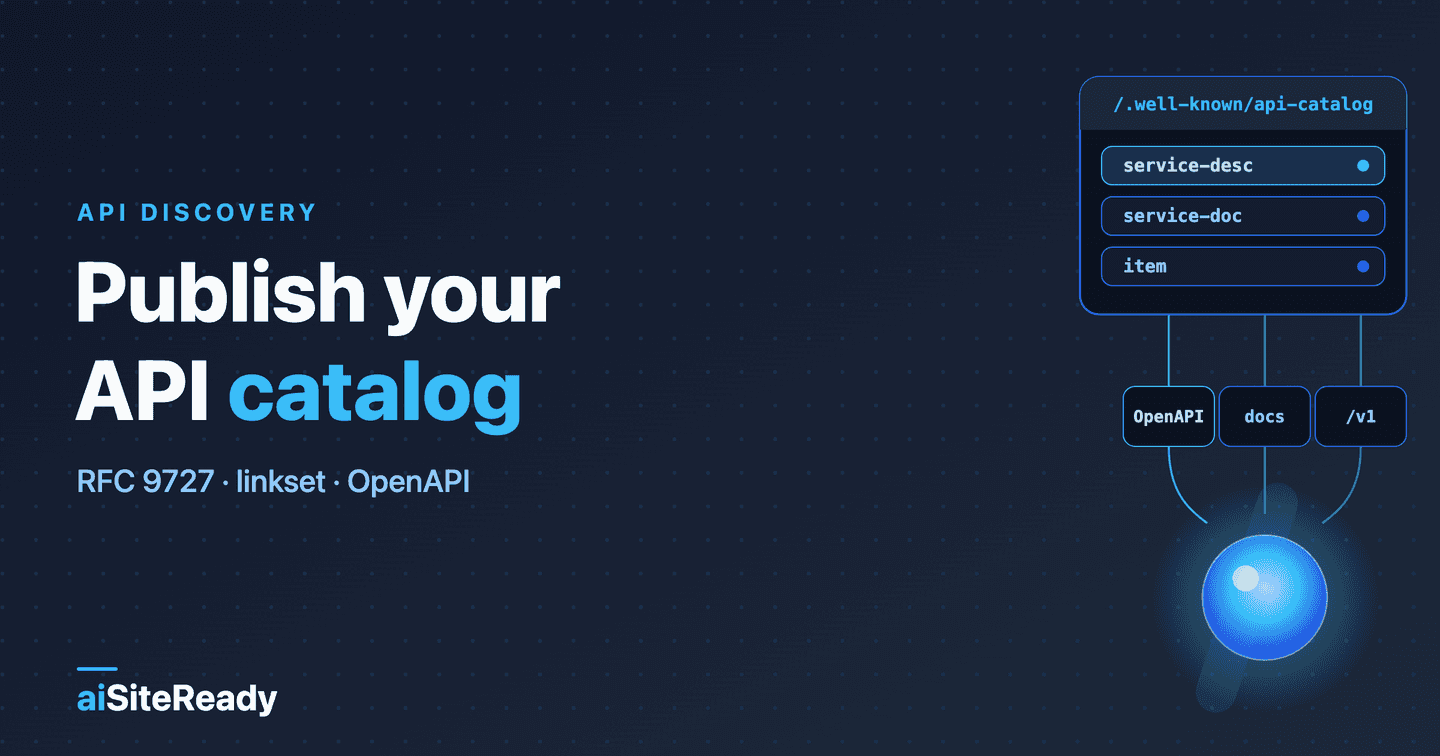
An RFC 9727 API catalog is one JSON file at /.well-known/api-catalog, served as application/linkset+json, that lists your public APIs and links each one to its machine-readable description, usually an OpenAPI document. A tool or an AI agent that knows only your domain can fetch it, follow the service-desc link, and learn what it can call without scraping a docs site. RFC 9727 is a Standards Track document published in June 2025 (IETF RFC 9727).
In the readiness stack this is the discovery step for APIs. It sits above the OpenAPI file and below the "callable" cards covered in make your site agent-callable, and it reuses the plumbing of Link headers and sitemaps: a well-known URL plus an HTTP header that points to it. Publishing one takes about fifteen minutes if your OpenAPI file is already public. That "if" is where most catalogs quietly fail.
Key takeaways
- RFC 9727 registers the
api-catalogwell-known URI and link relation. The catalog MUST beapplication/linkset+jsonand MUST link to API endpoints; theprofileparameter and OpenAPI links are SHOULD and RECOMMENDED (RFC 9727).- A catalog is only as useful as its
service-desctarget. If that URL is private, a 404, an HTML page, or invalid JSON, the agent learns nothing.- A publisher SHALL answer HEAD as well as GET at
/.well-known/api-catalog, and the HEAD response carries aLinkheader. Some routers answer GET only. Ours did until I tested it for this article.- Adoption is early. One independent probe in May 2026 found 4 of 74 API providers serving a real catalog, while 68 returned a 200 with an HTML page (API Evangelist). That is one author's sample, not a census.
- aiSiteReady's
api_catalogcheck passes only when a valid catalog leads to a valid OpenAPI or JSON Schema document. Scan your domain to see which step breaks.
What does RFC 9727 define?
RFC 9727 defines a predictable place to ask "which APIs does this host publish?" It registers the api-catalog well-known URI and the api-catalog link relation, and it says the document behind them must be a Linkset, the format from RFC 9264. A Linkset is a standalone document of typed links, each with a context (anchor), a relation, and a target.
RFC 9727 does not decide where your APIs live. The location of the catalog document is the publisher's choice, and /.well-known/api-catalog is just a convenient reference to it (RFC 9727, section 2).
Most of the normative text fits in one table.
| Requirement | Level | RFC 9727 |
|---|---|---|
Answer an HTTPS GET at /.well-known/api-catalog with the catalog | SHALL | section 2 |
Answer an HTTPS HEAD with a Link header carrying the section 3 relation | SHALL | section 2 |
Publish the catalog as application/linkset+json | MUST | sections 4.2, 6.2 |
Add profile="https://www.rfc-editor.org/info/rfc9727" | SHOULD | section 4.2 |
| Include hyperlinks to API endpoints | MUST | section 4.1 |
| Add metadata: usage policies, versions, OpenAPI links | RECOMMENDED | section 4.1 |
| Serve the catalog over HTTPS only | SHOULD | section 8 |
| Rate-limit the catalog endpoint | RECOMMENDED | section 8 |
| Review the catalog for leaked internal or sensitive details | SHOULD | section 8 |
Two rules are easy to miss. If you already list your APIs in another format and still want this URI, you MUST also serve a Linkset, and you MAY return your own format through content negotiation. And a catalog can link to other catalogs with the api-catalog relation, which is how you split a large portfolio across domains (sections 4.2, 4.3, and 5.1).
What does a minimal API catalog look like?
A minimal catalog is one JSON object with a linkset array holding a single entry for your API. Here is the whole exchange for one API on example.com.
GET /.well-known/api-catalog HTTP/1.1
Host: example.com
Accept: application/linkset+json

HTTP/1.1 200 OK
Content-Type: application/linkset+json; profile="https://www.rfc-editor.org/info/rfc9727"
Cache-Control: public, max-age=3600
{
  "linkset": [
    {
      "anchor": "https://api.example.com/v1",
      "service-desc": [
        {
          "href": "https://api.example.com/v1/openapi.json",
          "type": "application/json"
        }
      ],
      "service-doc": [
        { "href": "https://api.example.com/docs", "type": "text/html" }
      ],
      "item": [
        { "href": "https://api.example.com/v1/orders" }
      ]
    }
  ]
}
The shape is the JSON serialization from RFC 9264: the top-level object has linkset as its only member, and the value is an array even when there is one entry. Each entry has an optional anchor and one array per relation type. Every target needs an href (RFC 9264, section 4.2). The same RFC recommends giving every link an explicit absolute anchor, so the document still makes sense when it is copied out of its HTTP response.
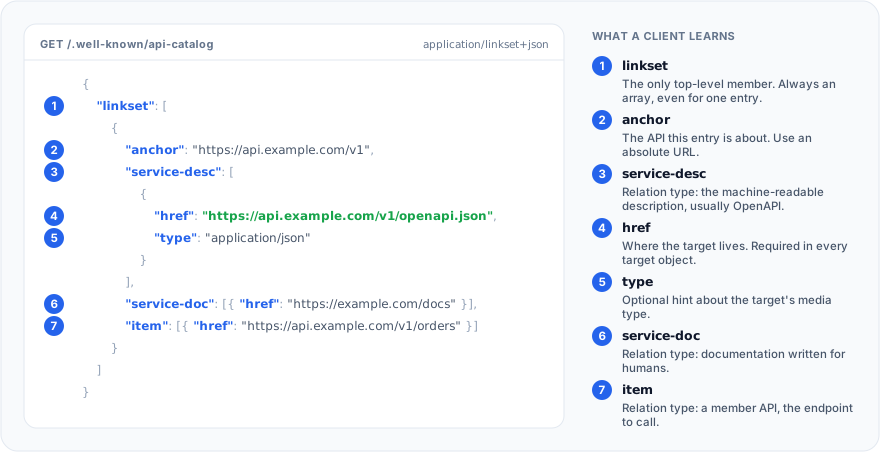
The relation names do the real work. service-desc links to a machine-readable description of the API, usually an OpenAPI file, and service-doc links to documentation written for people. Both come from RFC 8631, like service-meta, while item marks a target that is a member API of the catalog (RFC 9727, section 3.1).
| Member | What a client learns | Rule |
|---|---|---|
linkset | The set of links; always an array of entries | MUST be the only top-level member |
anchor | Which resource the links are about, here the API | MAY be omitted; SHOULD NOT be relative |
service-desc | Machine-readable description, usually OpenAPI | RFC 8631 relation |
service-doc | Human documentation | RFC 8631 relation |
service-meta | Machine-readable metadata: policies, labels | RFC 8631 relation |
item | A member API, the endpoint itself | RFC 9727, section 3.1 |
href | The target URL | MUST be present; SHOULD NOT be relative |
type | Optional hint about the target's media type | Optional target attribute |
How do you list several APIs and pick the right relations?
Add one entry per API, anchored at that API's base URL, and give each the relations it has. A fuller catalog with three entries looks like this. The first API publishes everything, the second ships its spec as YAML and JSON, and the third entry points at a partner's catalog.
{
  "linkset": [
    {
      "anchor": "https://api.example.com/orders/v2",
      "service-desc": [
        { "href": "https://api.example.com/orders/v2/openapi.json", "type": "application/json" }
      ],
      "service-doc": [
        { "href": "https://developer.example.com/orders", "type": "text/html" }
      ],
      "service-meta": [
        { "href": "https://developer.example.com/orders/policies.json", "type": "application/json" }
      ],
      "status": [
        { "href": "https://api.example.com/orders/v2/health", "type": "application/json" }
      ],
      "item": [
        { "href": "https://api.example.com/orders/v2" }
      ]
    },
    {
      "anchor": "https://api.example.com/inventory/v1",
      "service-desc": [
        { "href": "https://api.example.com/inventory/v1/openapi.yaml", "type": "application/yaml" },
        { "href": "https://api.example.com/inventory/v1/openapi.json", "type": "application/json" }
      ],
      "service-doc": [
        { "href": "https://developer.example.com/inventory", "type": "text/html" }
      ],
      "item": [
        { "href": "https://api.example.com/inventory/v1" }
      ]
    },
    {
      "anchor": "https://www.example.com/.well-known/api-catalog",
      "api-catalog": [
        { "href": "https://partners.example.com/.well-known/api-catalog" }
      ]
    }
  ]
}
RFC 9727's own examples show two main patterns. In one, each entry is anchored at an API and carries service-desc, service-doc, service-meta, and status. In the other, the anchor is the catalog URL and each API is an item bookmark (RFC 9727, appendix A). They are illustrations, not alternatives you must choose between. I combine them: per-API entries anchored at the API, plus an item link so the "links to API endpoints" requirement is met in the plainest possible way.
status is the relation for a health or status resource, also from RFC 8631. Use service-meta for anything a machine should read about the service that is not the spec, such as policies or labels.
How do clients discover /.well-known/api-catalog?
Two ways: they request /.well-known/api-catalog directly, or they read a Link header with rel="api-catalog" on a page you already serve. RFC 9727 allows the relation in the HTTP header, in the content, or both, and the target can be the well-known URI or any other URI the publisher chooses (section 3). The header syntax is plain RFC 8288 web linking (RFC 8288).
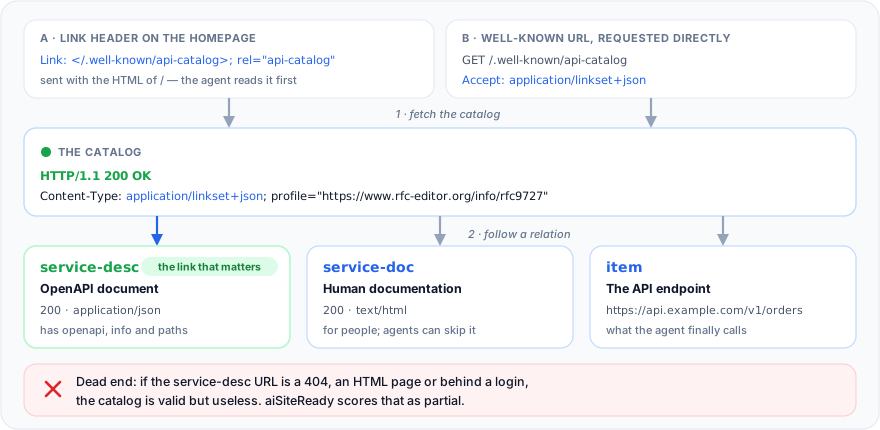
This is the header aiSiteReady's homepage sends today, one relation among four discovery links. The target is site-relative, so it stays correct on any deploy domain.
GET / HTTP/1.1
Host: www.ai-siteready.com
Accept: text/html

HTTP/2 200
content-type: text/html;charset=utf-8
link: </sitemap.xml>; rel="sitemap", </llms.txt>; rel="describedby", </site.webmanifest>; rel="manifest", </.well-known/api-catalog>; rel="api-catalog"
RFC 9727's own example advertises the catalog with a Link header and an a element carrying rel="api-catalog". Our scanner reads only the HTTP header of the root page, not HTML tags, so the header is the safer bet. The Link headers guide covers the syntax in more depth.
How do you serve /.well-known/api-catalog?
Return the JSON with the right Content-Type on both GET and HEAD, over HTTPS. Here is the real route from aiSiteReady's Nuxt server (Nitro), trimmed to the lines that matter. A pure builder renders the JSON, and the handler sets three headers, including the Link that section 2 asks for. It used to answer GET only, a gap I come back to below.
// frontend/server/routes/.well-known/api-catalog.ts (excerpt)
export default defineReadOnlyHandler((event) => {
  const config = useRuntimeConfig(event);
  const siteUrl = typeof config.public.siteUrl === "string" ? config.public.siteUrl : "";

  setResponseHeader(event, "Content-Type", API_CATALOG_CONTENT_TYPE);
  setResponseHeader(event, "Link", buildApiCatalogLinkHeader()); // </.well-known/api-catalog>; rel="api-catalog"
  setResponseHeader(event, "Cache-Control", "public, max-age=3600");

  return buildApiCatalog({ siteUrl });
});
defineReadOnlyHandler is our small wrapper: it runs the same handler for GET and HEAD, sends HEAD an empty body with the Content-Length GET would have, and answers other methods with 405. The content type comes from one constant: the linkset media type, charset=utf-8, and the RFC 9727 profile. The charset is our habit, not a requirement, and the scanner accepts it. The same idea in Express is shorter, and Express answers HEAD from a GET route automatically (Express docs).
app.get('/.well-known/api-catalog', (req, res) => {
  res
    .set('Content-Type', 'application/linkset+json; profile="https://www.rfc-editor.org/info/rfc9727"')
    .set('Cache-Control', 'public, max-age=3600')
    .set('Link', '</.well-known/api-catalog>; rel="api-catalog"')
    .send(JSON.stringify(CATALOG, null, 2));
});
I ran this exact handler locally: GET and HEAD returned the same headers. One side effect: res.send() with a string body appends charset=utf-8 to the Content-Type, the parameter the table below calls unnecessary. The RFC does not show a full HEAD exchange; the sensible reading of section 2 is a Link header with rel="api-catalog", which is what this handler sends. Settle these HTTP details before you ship.
| Detail | What to do | Basis |
|---|---|---|
Content-Type | application/linkset+json plus the profile parameter | MUST and SHOULD in section 4.2; RFC 9264 registers profile as the only optional parameter, so charset is unnecessary (UTF-8 is required) |
GET | 200 with the catalog body | SHALL, section 2 |
HEAD | 200, same headers as GET, plus a Link header | SHALL, section 2; RFC 9110 says a server SHOULD send the same headers |
Cache-Control | A short public TTL; we use one hour | The RFC only suggests caching and compression for large catalogs |
| CORS | Not needed for server-side agents; allow * only if browser code must read it | My recommendation; the RFC mentions CORS only for internal catalogs |
| TLS | HTTPS only | SHOULD, section 8 |
| Unknown paths | A real 404, never a 200 HTML page | See the mistakes below |
| Other domains | Redirect their well-known URL to the canonical catalog | RECOMMENDED, section 5.1 |
How does it relate to OpenAPI, MCP Server Cards, and Agent Skills?
They answer different questions, and none of them replaces another. The catalog says which APIs exist and where their descriptions live. OpenAPI describes one HTTP API. An MCP Server Card says how to connect to an MCP server. A skill says how to use your product well.
| Layer | Question it answers | Where it lives | Status as of October 2026 |
|---|---|---|---|
| API catalog | Which APIs does this host publish? | /.well-known/api-catalog | RFC 9727, June 2025 |
| OpenAPI | What operations and schemas does one API have? | The service-desc target | Spec v3.2.1, 10 September 2026 |
| MCP Server Card | How do I connect to this MCP server? | Any URI the publisher picks | Experimental repository |
| Agent Skills | How should an agent use this product? | /.well-known/agent-skills/index.json | Discovery RFC marked draft |
OpenAPI says a document may be JSON or YAML and recommends naming the entry document openapi.json or openapi.yaml (OpenAPI Specification v3.2.1). The catalog just links to it.
For MCP, the experimental Server Card repository says in its README that it is prototyping work, not an accepted or official MCP extension, and that clients find cards through AI Catalog entries. It does not mention RFC 9727, so do not expect an api-catalog entry to advertise an MCP server (MCP experimental server-card repo, AI Catalog). Publish the card separately: MCP Server Cards explained covers where.
Agent Skills are a different layer again. A skill is a directory with a SKILL.md of instructions (Agent Skills specification), and the web index for it is a draft (Cloudflare's discovery RFC). The two work together: aiSiteReady's own SKILL.md tells agents where the OpenAPI file, the interactive docs, and the catalog live. The Agent Skills guide shows the index format.
What mistakes break an API catalog?
Almost all of them are the same failure in different clothes: the catalog parses, but it leads nowhere or breaks a shape rule.
| Mistake | What happens | Fix |
|---|---|---|
Content-Type: application/json | Violates the MUST; our check reports api_catalog_not_linkset when no valid spec is reached | Serve application/linkset+json with the profile |
SPA catch-all returns 200 HTML at the path | Parsers choke; the scan sees no catalog (api_catalog_missing), or api_catalog_html_response when the HTML hides under a JSON content type | Return 404 for unknown paths, and exclude /.well-known/ from the fallback |
service-desc target is private, a 404, or behind a login | The catalog leads nowhere | Publish the spec at a public URL and test it with no cookies |
| Reverse proxy does not forward the spec path | Default FastAPI /openapi.json falls through to the frontend and 404s | Move the spec under a path the proxy forwards |
| One object where an array belongs | "service-desc": { "href": "..." } breaks RFC 9264 | Wrap every relation's targets in an array |
Relative href or anchor | The link loses its context when copied; RFC 9264 says SHOULD NOT | Build absolute URLs from the canonical origin |
| YAML-only OpenAPI | Our check reads JSON only and reports api_catalog_documents_invalid_json | Also publish openapi.json |
GET works, HEAD returns 404 | Breaks the section 2 SHALL | Route both methods |
| Spec or catalog lists internal APIs | The RFC asks for a review before deployment | Audit it; frameworks often emit every route |
The array rule has a footnote worth knowing. The example in RFC 9727, section 5.1, writes "api-catalog": "https://..." as a plain string. An erratum filed against the RFC (ID 9009, status "Reported", not verified) says it should be an array holding a link object, as RFC 9264 requires (RFC Editor errata). Follow RFC 9264's shape.
What did building aiSiteReady's own catalog teach me?
The catalog was the easy part. The api_catalog check already existed when I shipped aiSiteReady's own catalog; the hard part was making the file it points to reachable. The builder lives in frontend/src/shared/lib/seo/api-catalog.ts and emits one entry anchored at /api/v1, with service-desc to /api/v1/openapi.json, service-doc to /api/v1/docs, and item to /api/v1/scans.
FastAPI serves /openapi.json and /docs by default. In production our nginx sends only /api/* (and /health) to the backend and everything else to the Nuxt frontend, so the defaults fell through to the frontend and returned 404. The fix was to relocate them with openapi_url="/api/v1/openapi.json" and docs_url="/api/v1/docs", which moves the HTTP surface without changing the schema content.
No nginx change was needed: the existing /api/ location in deploy/nginx/default.conf already forwards both. I kept its Content-Security-Policy line in the excerpt because it matters for the docs page below.
# trimmed from deploy/nginx/default.conf
location /api/ {
    add_header Content-Security-Policy "default-src 'none'; style-src 'unsafe-inline'; frame-ancestors 'none'; base-uri 'none'; form-action 'none'" always;
    proxy_pass http://fastapi_backend/api/;
}
Checked on 2 October 2026, production returns the catalog with application/linkset+json; charset=utf-8; profile="https://www.rfc-editor.org/info/rfc9727", and the spec at /api/v1/openapi.json returns 200 as application/json. The old root /openapi.json returns 404, as intended.
Testing my own site for this article turned up one new gap and put a known one back on my list.
The new one was HEAD. On 2 October 2026, curl -I against /.well-known/api-catalog returned 404. The route file ended in .get.ts, which Nitro scopes to GET, and its router has no HEAD fallback; the unsuffixed sitemap.xml and llms.txt routes answered HEAD with 200. That broke the section 2 SHALL, and our scanner does not probe HEAD yet, so it had not noticed. The fix is the route above: an unsuffixed file, one handler for GET and HEAD, and the Link header. The other .well-known documents got the same change.
The known one is the docs page. /api/v1/docs returns 200, but the page renders blank in a browser. The Content-Security-Policy on /api/ responses starts with default-src 'none', which blocks the CDN scripts Swagger UI needs. Our check passes as long as one linked document is valid OpenAPI, so it is a human following service-doc who hits the empty page. That one is still open as of this writing.
How do you verify your catalog with curl?
Request it the way an agent would, check the status and Content-Type, then follow service-desc and confirm the spec parses. Run this against your public domain, not localhost, because most breakage lives in the proxy and CDN layer.
# GET: expect 200 and application/linkset+json with the profile parameter
curl -sS -D - -o /dev/null -H 'Accept: application/linkset+json' https://example.com/.well-known/api-catalog
# HEAD: expect 200 and a Link header with rel="api-catalog"
curl -sSI https://example.com/.well-known/api-catalog
# Follow service-desc and check it looks like OpenAPI
curl -sS https://example.com/.well-known/api-catalog | jq -r '.linkset[]."service-desc"[]?.href'
curl -sSL https://api.example.com/v1/openapi.json | jq '{openapi, title: .info.title, paths: (.paths | length)}'
The first command should print a 200 status line and a content-type: application/linkset+json; profile="https://www.rfc-editor.org/info/rfc9727" header. The last should print the OpenAPI version, the API title, and a non-zero path count. Wire the same checks into CI so a deploy cannot silently break discovery.
#!/usr/bin/env bash
set -euo pipefail
SITE="${1:?usage: check-catalog.sh https://example.com}"
CAT="$SITE/.well-known/api-catalog"

H="$(curl -sS -D - -o /dev/null -H 'Accept: application/linkset+json' "$CAT")"
grep -qiE '^HTTP/[0-9.]+ 200' <<<"$H" || { echo 'FAIL: GET is not 200'; exit 1; }
grep -qi '^content-type: application/linkset+json' <<<"$H" || { echo 'FAIL: Content-Type'; exit 1; }
grep -qi 'profile="https://www.rfc-editor.org/info/rfc9727"' <<<"$H" || echo 'WARN: no RFC 9727 profile'

HH="$(curl -sS -I "$CAT")"
grep -qiE '^HTTP/[0-9.]+ 200' <<<"$HH" || echo 'WARN: HEAD is not 200'
grep -qi '^link:.*rel="\?api-catalog' <<<"$HH" || echo 'WARN: HEAD has no Link rel=api-catalog'

curl -sS "$CAT" | jq -r '.linkset[]."service-desc"[]?.href' | while read -r SPEC; do
  curl -sSfL "$SPEC" | jq -e '(.openapi|type=="string") and (.info|type=="object") and (.paths|type=="object" and length>0)' >/dev/null \
    && echo "OK: $SPEC" || { echo "FAIL: $SPEC is not valid OpenAPI JSON"; exit 1; }
done
I ran this script against aiSiteReady on 2 October 2026, and it printed the two HEAD warnings from the gap above, then OK for the spec. A clean site prints only OK lines.
How do you scan /.well-known/api-catalog on every release?
Doing this by hand once is fine. Doing it on every release, and across the other protocol layers, is what a scan is for. aiSiteReady's api_catalog check runs inside the Protocol/API category. It requests /.well-known/api-catalog and any Link header with rel="api-catalog" on the root page, all through an SSRF-safe fetcher, and then follows up to five linked description documents, service-desc first.
A catalog counts as valid when it yields at least one link, and the scan records whether it was served as application/linkset+json and carried the RFC 9727 profile. A description counts as valid when it is an OpenAPI document with a version string, an info object, and a non-empty paths object, or a JSON Schema with a structural keyword. Each scan ends in one of four statuses.
| Status | When |
|---|---|
| PASS | A valid catalog leads to at least one valid OpenAPI or JSON Schema document |
| PARTIAL | A catalog exists but is not a linkset or links to invalid documents; the path returns an HTML page under a non-HTML content type; or a Link header points to a catalog that cannot be fetched |
| FAIL | Nothing found at the well-known path or in the Link header, or only a text/html page |
| UNKNOWN | The fetch was blocked or timed out; a 403 or 429 counts here, not as a FAIL |
Today the linkset format is recorded as a signal and does not gate the PASS: a plain-JSON catalog that leads to a valid OpenAPI file still passes. Do not rely on that, because it is not conformant. The check does not run for the Content site profile (content_site), and it counts 1.75 times as much in the API/Application profile (api_application) as in All checks (all). The methodology page lists every check and weight.
Put it into a routine with the 30-minute readiness audit, and see what AI agent readiness means for the full stack. Run a free scan to see whether an agent can go from your domain to a valid OpenAPI file, and which fix to make first, in English, Ukrainian, or Russian.
The short version: publish one application/linkset+json document at /.well-known/api-catalog, link every API's OpenAPI file with service-desc, answer GET and HEAD, and test that the spec is public. A catalog that points at a dead end is worse than none, because it looks finished.
IMozz has 20 years in software development, with the past year spent building with LLMs. He builds aiSiteReady, a read-only scanner that checks whether AI agents can read and call a site. It server-renders its own content as a working example.