AI agent readiness audit: check your site in 30 minutes
Run an AI agent readiness audit in 30 minutes: six curl blocks for reach, content, discovery, data, APIs, and policy, plus one script that runs them all.
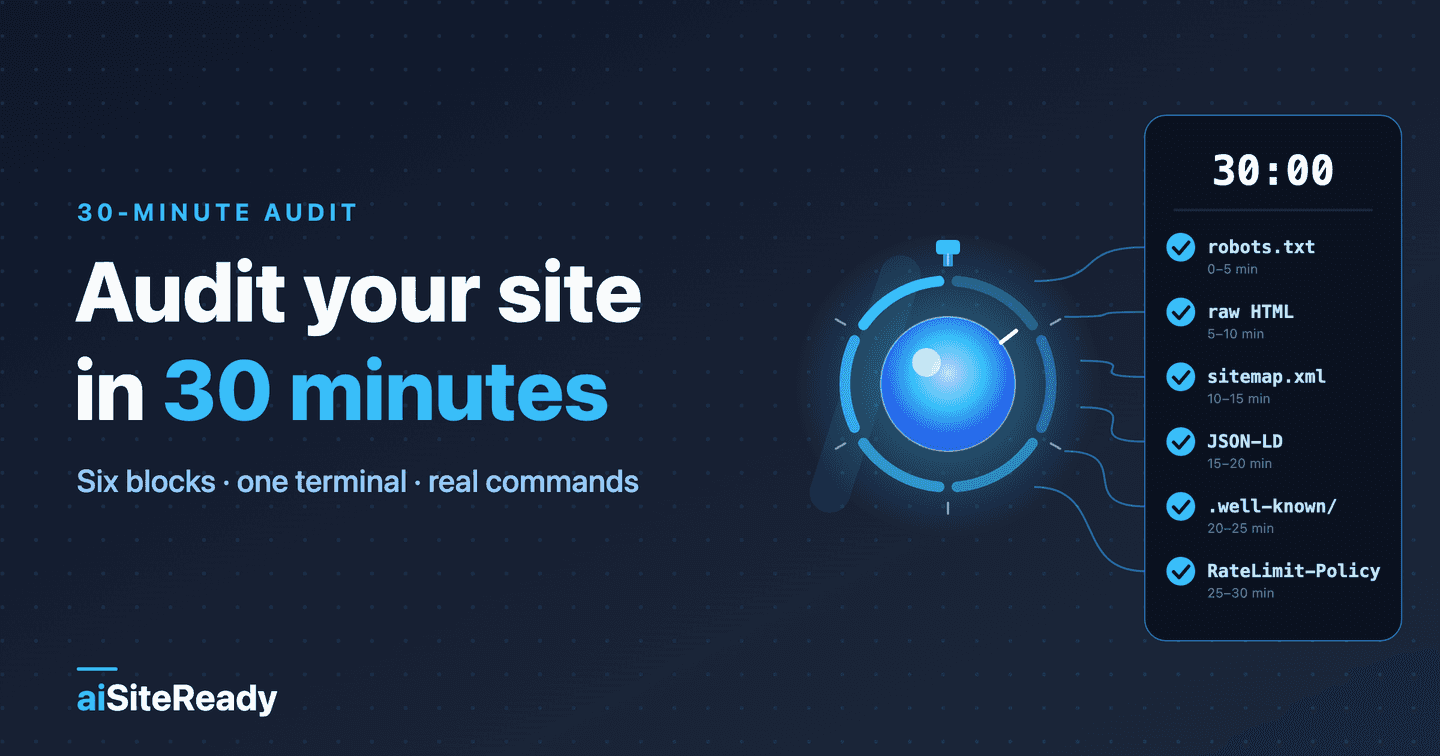
An AI agent readiness audit of your own site takes about 30 minutes of probing: six five-minute blocks, one terminal, and a few curl commands that show whether AI agents can reach, read, find, understand, and call it. Scoring the results and choosing what to fix takes about 10 more.
Every command below is real. I ran each one against www.ai-siteready.com, our own production site, on 2 and 3 October 2026, and the outputs are trimmed copies of what came back.
A scanner automates all of this, but doing it once by hand shows what each signal looks like on the wire, which makes any automated report easier to trust. The blocks follow the order a bot meets your site: reach first, because nothing else matters if a firewall turns the bot away, and calling last, because most sites don't need it yet. For the concept behind the stack, start with what AI agent readiness means.
Key takeaways
- The audit is six blocks (reach, read, discover, understand, call, govern). Between them they touch all 21 checks in the aiSiteReady scanner.
- Do reach and read first. A bot that gets a 403 or an empty JavaScript shell never sees the rest, and Vercel's December 2024 analysis found that OpenAI's, Anthropic's, and Perplexity's crawlers don't render JavaScript (Vercel).
- Early blocks are where most sites pass; late ones are where almost nobody does. Cloudflare's April 2026 scan of the top 200,000 domains found 78% with a
robots.txt, about 4% declaring AI preferences, and 3.9% passing Markdown negotiation (Cloudflare).- Not every miss matters equally. Google says you need no special AI files and that Search ignores
llms.txt(Google). Triage by impact and effort.- A manual audit is a snapshot. Automate it once you have many templates or ship often.
What does a 30-minute AI agent readiness audit cover?
Six blocks, each aimed at one kind of failure. aiSiteReady groups its checks into five categories: Discoverability, Content Accessibility, Bot Governance, Protocol/API, and Commerce. The audit cuts across them in the order a crawler meets a site, so one category can span two blocks.
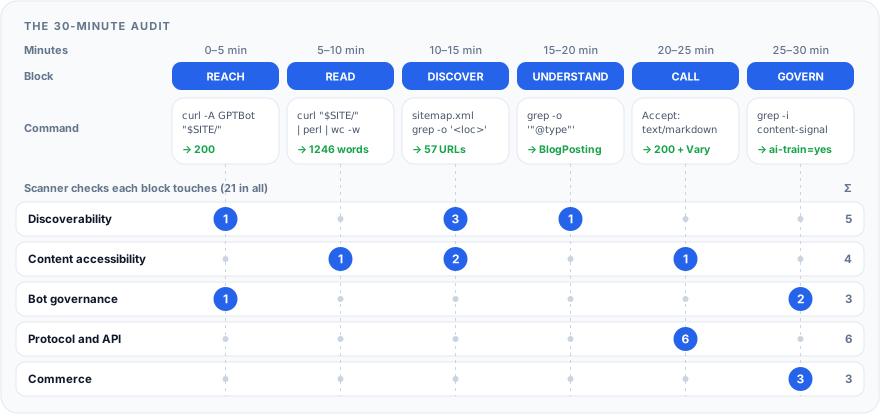
You need curl and perl, both preinstalled on macOS and most Linux systems. Point the variable at your own site and only your own: later steps send crawler user agents, which is fine for testing your rules and not fine for probing someone else's server.
Run the page checks on your home page and on one URL per template, such as an article or a product page, because a problem often lives in a single template. The second line below follows redirects, so a bare domain or an http:// address resolves to the origin that actually answers.
export SITE=https://www.example.com    # your site, no trailing slash
SITE=$(curl -sS -L -o /dev/null -w '%{url_effective}' "$SITE/" | sed -E 's#^(https?://[^/]+).*#\1#')    # apex -> www, http -> https
hdr() { curl -sS -D - -o /dev/null "$@" | tr -d '\r'; }    # GET, print headers only
How do you check that AI bots can reach your site? (minutes 0–5)
Request the home page and robots.txt normally, then repeat the home page request with AI-crawler user agents. Each answer should be a plain 200, or a refusal you chose on purpose.
curl -sS -o /dev/null -L -w 'status=%{http_code} redirects=%{num_redirects} time=%{time_total}s\n' "$SITE/"
curl -sS -o /dev/null -L -w 'robots.txt: %{http_code} %{content_type}\n' "$SITE/robots.txt"
for bot in GPTBot OAI-SearchBot ClaudeBot PerplexityBot; do
  printf '%-15s ' "$bot"
  curl -sS -o /dev/null -L -A "Mozilla/5.0 (compatible; $bot/1.0)" -w '%{http_code}\n' "$SITE/"
done
status=200 redirects=0 time=0.318752s
robots.txt: 200 text/plain; charset=utf-8
GPTBot          200
OAI-SearchBot   200
ClaudeBot       200
PerplexityBot   200
| Signal | Good | Bad |
|---|---|---|
| Home page | 200, at most one redirect | 403, 429, a 5xx, a redirect chain |
robots.txt | 200, text/plain, rules you wrote | 5xx, 429, or timeout; HTML at that path |
| Bot user agents | the same 200 a browser gets | 403, 429, a challenge page |
| Disallow rules | none you didn't intend | Disallow: / under an AI bot |
The robots.txt row hides an asymmetry. RFC 9309 says that if the file is unavailable (a 4xx), a crawler may access any resource, but if it is unreachable because of a server or network error, the crawler must assume complete disallow (RFC 9309). Google treats every 4xx except 429 as a missing file (Google), so count a 429 as a failure. A broken robots.txt is worse than none. Then look for a blanket block someone added by accident:
curl -sS "$SITE/robots.txt" | tr -d '\r' | awk '{l=$0; sub(/#.*/,"",l); gsub(/[ \t]/,"",l); k=tolower(l)} k==""{next} k~/^user-agent:/{if(!g)u=""; g=1; u=u" "substr(l,12); next} {g=0} k=="disallow:/"{print substr(u,2)" -> Disallow: /"}'
On our site this prints nothing, which is the good result. Fed a file that blocks OpenAI's training crawler, it prints GPTBot -> Disallow: /. A group that names several bots prints them all on one line, and Disallow:/ without a space still counts.
Having no accidental block doesn't mean you pass the scanner's ai_bot_rules check. That check wants named groups for OAI-SearchBot, Claude-SearchBot, and PerplexityBot, plus an explicit allow or disallow for at least one training crawler: GPTBot, ClaudeBot, or CCBot. A lone User-agent: * group earns only a PARTIAL. grep -i '^user-agent' on your robots.txt lists the groups you have.
The user-agent loop exercises only rules that key on the user-agent string, and it sends a crawler's name from your own IP address. Firewalls also filter by IP address and bot score, and OpenAI publishes IP ranges for each crawler (OpenAI). A bot-management firewall can block a request that claims a crawler's name but doesn't come from that crawler's published IP ranges, and still let the real crawler through.
So a 403 to a spoofed user agent is a hint to confirm in your firewall logs, not proof of a block, and a 200 is necessary but not sufficient. Anthropic adds that blocking by IP can stop its bots from reading robots.txt at all (Anthropic). After a rule change, wait: OpenAI says its systems can take about 24 hours to adjust search results (OpenAI).
Scanner equivalents: robots_txt and ai_bot_rules.
Can an AI agent read your page without JavaScript? (minutes 5–10)
Fetch the page the way the simplest crawler does, with no JavaScript, and count the words that survive. The perl filter drops script, style, template, and SVG blocks, then strips the remaining tags.
curl -sS -L "$SITE/" | perl -0777 -pe 's/<(script|style|noscript|template|svg)\b.*?<\/\1>//gsi; s/<[^>]+>/ /gs' | wc -w
curl -sS -L "$SITE/" | grep -o -i -E '<(h1|h2|main|title)[ >]' | tr 'A-Z' 'a-z' | sort | uniq -c
1246
   1 <h1
   5 <h2
   1 <main
   1 <title>
You want hundreds of words, one h1, real headings, and your actual copy; a near-zero count and a markup skeleton mean trouble. I pointed the same filter at a page whose body is an empty div plus a script tag, the classic client-rendered shell, and it printed 0. That is what GPTBot or ClaudeBot gets from such a page. Vercel's December 2024 measurement found Gemini and AppleBot to be the exceptions that do render (Vercel).
A web app behind a login shows only its login shell, and that's expected. And a big count isn't enough alone: if the words are cookie banners and navigation, read the text itself.
Scanner equivalent: ssr_content.
How do you check discovery, from sitemap to llms.txt? (minutes 10–15)
Confirm a bot can find your pages without guessing: a sitemap referenced from robots.txt, one canonical URL per page, discovery relations in the Link header, and optionally an llms.txt.
curl -sS "$SITE/robots.txt" | grep -i '^sitemap:'
hdr "$SITE/sitemap.xml" | grep -i -E '^(HTTP|content-type)'
curl -sS "$SITE/sitemap.xml" | grep -o '<loc>' | wc -l
curl -sS "$SITE/" | grep -o '<link[^>]*rel="canonical"[^>]*>'
hdr "$SITE/" | grep -i '^link:'
hdr "$SITE/llms.txt" | grep -i -E '^(HTTP|content-type)'
hdr "$SITE/llms-full.txt" | grep -i -E '^(HTTP|content-type)'
Sitemap: https://www.ai-siteready.com/sitemap.xml
HTTP/2 200
content-type: application/xml; charset=utf-8
57
<link id="i18n-can" rel="canonical" href="https://www.ai-siteready.com">
link: </sitemap.xml>; rel="sitemap", </llms.txt>; rel="describedby", </site.webmanifest>; rel="manifest", </.well-known/api-catalog>; rel="api-catalog"
HTTP/2 200
content-type: text/markdown; charset=utf-8
HTTP/2 200
content-type: text/markdown; charset=utf-8
Read the output against this table:
| Signal | Good | Bad |
|---|---|---|
| Sitemap | XML, a non-zero <loc> count, listed in robots.txt | a 404, an HTML page answering 200, URLs from a staging domain |
| Canonical | one absolute URL that matches the page | missing, doubled, or at odds with your sitemap |
llms.txt | 200 with text/markdown or text/plain | HTML at that path, which a catch-all route often serves |
The Link header is the cheapest signal: RFC 8288 defines it as a way to serialize links into HTTP headers, and each link must carry a rel (RFC 8288). Ours points to the sitemap, the llms.txt, and the API catalog without a client parsing HTML.
Keep llms.txt in proportion. The proposal's only required part is an H1, followed by a short blockquote summary and link sections (llmstxt.org); it is a proposal, not a standard. Ahrefs found that about 28% of 137,000 domains in its Web Analytics data publish one, and 97% of those files got no requests in May 2026 (Ahrefs). It's cheap to publish, and a poor reason to delay anything above it.
Scanner equivalents: sitemap, canonical_metadata, link_headers, llms_txt, llms_full_txt.
Does your structured data say who wrote it and when? (minutes 15–20)
List the JSON-LD types in the raw HTML, then check that an article carries an author and dates. Set ARTICLE to any article on your site; I used /blog/serve-markdown-to-ai-agents on ours. Structured data that a script injects after load won't appear in this output, which is the point.
ARTICLE="$SITE/path/to/an/article"    # any article URL on your site
curl -sS "$SITE/" | grep -o '"@type": *"[^"]*"' | sort | uniq -c
curl -sS "$ARTICLE" | grep -o -E '"(datePublished|dateModified)": *"[^"]*"|"author": *\{[^}]*\}'
  10 "@type":"Answer"
   1 "@type":"FAQPage"
   1 "@type":"ImageObject"
   1 "@type":"Offer"
   1 "@type":"Organization"
  10 "@type":"Question"
   1 "@type":"SoftwareApplication"
   1 "@type":"WebSite"
"datePublished":"2026-06-07"
"dateModified":"2026-06-07"
"author":{"@type":"Person","name":"IMozz","url":"https://github.com/i-mozz"}
The home page should carry an Organization and a WebSite, and each article a BlogPosting with a Person author, datePublished, and dateModified. Google lists those three as recommended Article properties and none as required (Google). Look out for empty output, dates that exist only as visible text, or an author named "admin". Stores should also see Product here. For articles, see the author, date, and JSON-LD checklist.
Scanner equivalent: generic_structured_data.
Can an agent call your site? (minutes 20–25)
Ask for Markdown, then probe the well-known paths where agent-facing endpoints are advertised. Content sites can skim the second half; it matters for products with an API or tools.
hdr -H 'Accept: text/markdown' "$SITE/" | grep -i -E '^(HTTP|content-type|vary)'
for p in api-catalog agent-skills/index.json ai-catalog.json mcp/server-card.json agent-card.json \
         oauth-authorization-server oauth-protected-resource; do
  printf '%-44s ' "/.well-known/$p"
  curl -sS -o /dev/null -L -w '%{http_code} %{content_type}\n' "$SITE/.well-known/$p"
done
HTTP/2 200
content-type: text/markdown; charset=utf-8
vary: Accept-Encoding
vary: Accept
/.well-known/api-catalog                     200 application/linkset+json; charset=utf-8; profile="https://www.rfc-editor.org/info/rfc9727"
/.well-known/agent-skills/index.json         200 application/json; charset=utf-8
/.well-known/ai-catalog.json                 404 application/json
/.well-known/mcp/server-card.json            200 application/json; charset=utf-8
/.well-known/agent-card.json                 200 application/json; charset=utf-8
/.well-known/oauth-authorization-server      404 application/json
/.well-known/oauth-protected-resource        404 application/json
For Markdown, you want text/markdown plus Vary: Accept, so a cache can't hand Markdown to a browser; Vary: Accept-Encoding alone doesn't count. If you're not on Cloudflare, see serving Markdown without Cloudflare. Read the sweep by status code, not content type: our three 404 rows still say application/json, because the error body is JSON.
| Path | Advertises | Status of the standard |
|---|---|---|
api-catalog | your APIs, linking an OpenAPI file | RFC 9727 (RFC 9727) |
ai-catalog.json | AI artifacts, including MCP Server Cards | draft; the discovery entry point in the MCP draft |
mcp/server-card.json | an MCP server and its endpoint | experimental, not an official extension; older path (MCP repo) |
agent-skills/index.json | skills an agent can load | Draft 0.2.0 (spec repo) |
oauth-* | OAuth server and resource metadata | RFC 8414 and RFC 9728 (RFC 8414, RFC 9728) |
Site type decides what a 404 means. A site with no OAuth-protected API should get a 404 on both OAuth rows, and ours does; a site that runs OAuth should get 200. The scanner treats that 404 as N/A when it sees no OAuth signal, unless you pick the API/Application profile: there, a 404 fails even for a service that uses only API keys.
The MCP card location has moved. The current draft lets a card live at any unreserved URI, recommends <mcp-url>/server-card, and points discovery at /.well-known/ai-catalog.json; it lists /.well-known/mcp/server-card as considered and not recommended (discovery.md). aiSiteReady's scanner still probes the older path, and our site still serves its card there without an AI Catalog. The MCP Server Card post has the details.
The Agent Skills digest is a SHA-256, so curl -sS "$SITE/.well-known/agent-skills/scan-url/SKILL.md" | shasum -a 256 should print the hex after sha256: in the index; on our site it does. Agent support for all of this is uneven, and several specs are drafts.
Scanner equivalents: markdown_negotiation, api_catalog, mcp_server_card, agent_skills, a2a_webmcp_readiness, oauth_authorization_server, oauth_protected_resource.
What usage rules, rate limits, and product data do you publish? (minutes 25–30)
Last block: tell agents what they may do, how fast, and, if you sell things, what you sell.
curl -sS "$SITE/robots.txt" | grep -i -E '^content-(signal|usage)'
hdr "$SITE/" | grep -i '^content-usage:' || echo 'content-usage header: none'
curl -sS -o /dev/null -w 'tdmrep: %{http_code}\n' "$SITE/.well-known/tdmrep.json"
hdr "$SITE/" | grep -i -E '^(ratelimit|ratelimit-policy|retry-after)'
curl -sS -o /dev/null -w 'ucp: %{http_code}\n' "$SITE/.well-known/ucp"
Content-Signal: search=yes, ai-input=yes, ai-train=yes
content-usage header: none
tdmrep: 404
ratelimit-policy: "scan";q=20;w=60
ucp: 404
Usage preferences. Content Signals, which Cloudflare published in September 2025, add a Content-Signal line to robots.txt with three signals, search, ai-input, and ai-train, each yes or no (Cloudflare). Ours permits all three. The IETF's own vocabulary, with the labels train-ai, ai-use, and search, is still an Internet-Draft (revision 08, September 2026) and may change (IETF aipref).
The IETF version travels as a Content-Usage line in robots.txt or a Content-Usage response header, so the block checks both. Our site publishes neither, as the output shows, and aiSiteReady's scanner doesn't read Content-Usage yet either. Any explicit machine-readable preference beats silence.
Rate-limit hints. The IETF draft for RateLimit-Policy and RateLimit is at revision 11 (May 2026) and is not an RFC; its example is RateLimit-Policy: "default";q=100;w=10, a quota of 100 over 10 seconds (IETF). Ours advertises a policy named scan, 20 requests per 60 seconds, which is the public limit on starting a scan. The RateLimit-Policy guide covers the syntax, handling a 429, and server configurations.
Commerce depends on site type. aiSiteReady is a SaaS tool, so a 404 on /.well-known/ucp is correct for us. Our home page has an Offer with a price but no Product, and a standalone offer isn't product data. For a store, run the @type command from block 4 on a product page and expect Product plus an Offer with price and priceCurrency.
The scanner's product-feed check also looks for feed hints in headers and metadata. UCP, the protocol Shopify and Google announced in January 2026, puts a merchant profile at /.well-known/ucp (Shopify, UCP). The steps are in publishing a UCP profile.
Scanner equivalents: content_usage_policy, rate_limit_hints, product_structured_data, product_feed_hints, agentic_commerce_signals.
How do you score the audit and decide what to fix first? (minutes 30–40)
Score each row the way the scanner does: a PASS counts 1, a PARTIAL 0.5, a FAIL 0, and a row that doesn't apply drops out. aiSiteReady also weights checks by severity (high ×2, medium ×1, low ×0.5) and rolls categories up by profile into a 0–100 Agent Readiness Score and a Level from 0 to 5 (methodology).
A check that can't complete is unknown, "could not verify" rather than "failed", so re-test it: until you do, it scores 0 like a FAIL and stays in the total. The Content site profile gives Protocol/API and Commerce zero weight, so you can skip those rows.
Fill in the worksheet, one row per check. Wt is the scanner's severity: H, M, or L, and a dash means the scanner has no matching check. The weights are the scanner's; my triage below puts llms.txt lower on purpose.
| Check | Command | Passes when | Wt | Fix |
|---|---|---|---|---|
| 1 · bot reach | curl -A loop | the same 200 a browser gets, for every AI user agent | — | firewall or CDN bot settings |
| 1 · AI bot rules | awk, grep '^user-agent' | named groups for the search bots, an explicit training decision, no accidental block | H | robots guide |
1 · robots.txt | %{http_code}, %{content_type} | 200 text/plain, or a deliberate 404; never 5xx or 429 | H | robots guide |
| 2 · raw-HTML content | perl word count | hundreds of words, one h1 | H | JavaScript sites |
| 3 · sitemap | grep -o '<loc>' | XML, non-zero count, in robots.txt | H | find your pages |
| 3 · canonical, Link header | grep, hdr | one absolute canonical; discovery relations | L, M | find your pages |
3 · llms.txt | hdr | 200, Markdown, H1, summary, links | H | llms.txt |
| 4 · JSON-LD | grep '@type' | Organization, WebSite; article author and dates | M | structured data |
| 5 · Markdown | Accept header | text/markdown plus Vary: Accept | H | Markdown |
| 5 · API catalog | well-known sweep | 200 linkset+json to an OpenAPI file | M | API catalog |
| 5 · MCP, skills, A2A | well-known sweep | 200 JSON if you ship the surface | M | callable site |
| 5 · OAuth metadata | well-known sweep | 200 if you run OAuth; the API/Application profile expects it | M | OAuth |
| 6 · usage preferences | grep content- | an explicit machine-readable signal | M | usage rules |
| 6 · rate-limit hints | hdr | RateLimit-Policy or Retry-After | L | rate limits |
| 6 · stores only | product page, ucp | Product plus priced Offer; 200 profile | M, L | commerce |
Then sort the failures by impact (how much of the stack a miss blocks) and effort (how long the fix takes). The placement below is qualitative and assumes a typical content site; an API product would move the protocol items up.
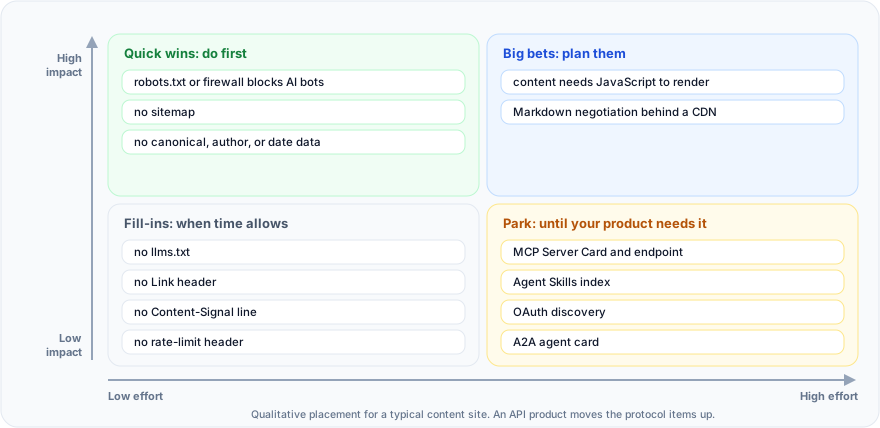
Work the top row from left to right. A bot-blocking rule is often a one-line fix that unblocks everything else. A client-rendered site is a project, but without it the rest of the stack has nothing to describe. The bottom row is polish and product-dependent work. Re-run the audit after each fix.
Can you run the whole audit as one script?
Yes, for the parts that are a header or a body match. This script runs the quick checks from all six blocks and prints PASS, WARN, FAIL, or INFO per line: FAIL is a blocking problem, WARN is worth fixing, INFO is optional or product-dependent. The word-count thresholds are my own rule of thumb, not the scanner's.
It starts by following redirects from the URL you pass, so a bare domain or an http:// address is audited at the origin that answers. It also checks content types, not just status codes, because a single-page app can answer 200 with HTML on every path.
#!/usr/bin/env bash
# agent-audit.sh - quick agent-readiness probe. Test only sites you own.
# Usage: ./agent-audit.sh https://www.example.com
set -u
SITE="${1:?usage: agent-audit.sh https://www.example.com}"
SITE="${SITE%/}"
# Audit the origin the home page lands on (apex -> www, http -> https).
SITE=$(curl -sS -m 10 -L -o /dev/null -w '%{url_effective}' "$SITE/" 2>/dev/null | sed -E 's#^(https?://[^/]+).*#\1#')
pass=0; warn=0; fail=0
ok()   { printf 'PASS  %s\n' "$1"; pass=$((pass+1)); }
warn() { printf 'WARN  %s\n' "$1"; warn=$((warn+1)); }
bad()  { printf 'FAIL  %s\n' "$1"; fail=$((fail+1)); }
info() { printf 'INFO  %s\n' "$1"; }
code() { curl -sS -L -m 10 -o /dev/null -w '%{http_code}' "$@" 2>/dev/null; }
ctyp() { curl -sS -L -m 10 -o /dev/null -w '%{http_code} %{content_type}' "$@" 2>/dev/null; }
hdrs() { curl -sS -L -m 10 -D - -o /dev/null "$@" 2>/dev/null | tr -d '\r'; }
body() { curl -sS -L -m 10 "$@" 2>/dev/null; }

# 1. REACH
c=$(code "$SITE/")
[ "$c" = 200 ] && ok "home returns 200" || bad "home returned $c"
c=$(ctyp "$SITE/robots.txt")
case "$c" in
  "200 text/plain"*) ok "robots.txt returns 200 text/plain" ;;
  200*) warn "robots.txt returns 200 as ${c#200 } (HTML catch-all?)" ;;
  429*) bad "robots.txt returned 429 (Google treats it like a 5xx)" ;;
  4??*) warn "robots.txt returned ${c%% *} (no rules: crawlers may fetch everything)" ;;
  *)    bad "robots.txt returned ${c%% *} (5xx/unreachable = crawlers assume full disallow)" ;;
esac
for bot in GPTBot OAI-SearchBot ClaudeBot PerplexityBot; do
  c=$(code -A "Mozilla/5.0 (compatible; $bot/1.0)" "$SITE/")
  [ "$c" = 200 ] && ok "UA $bot gets 200" || bad "UA $bot gets $c (user-agent rule? confirm in firewall logs)"
done

# 2. READ
html=$(body "$SITE/")
words=$(printf '%s' "$html" | perl -0777 -pe 's/<(script|style|noscript|template|svg)\b.*?<\/\1>//gsi; s/<[^>]+>/ /gs' | wc -w | tr -d ' ')
if   [ "$words" -ge 200 ]; then ok "$words words in raw HTML"
elif [ "$words" -ge 50 ];  then warn "only $words words in raw HTML"
else bad "$words words in raw HTML (JavaScript shell?)"; fi
printf '%s' "$html" | grep -qi '<h1[ >]' && ok "an h1 is in the raw HTML" || bad "no h1 in the raw HTML"

# 3. DISCOVER
if body "$SITE/robots.txt" | grep -qi '^sitemap:'; then ok "robots.txt lists a Sitemap"; else warn "no Sitemap line in robots.txt"; fi
body "$SITE/sitemap.xml" | grep -qiE '<(urlset|sitemapindex)' && ok "sitemap.xml parses as a sitemap" || warn "no sitemap at /sitemap.xml"
printf '%s' "$html" | grep -qiE '<link[^>]+rel="canonical"' && ok "canonical link found" || warn "no canonical link"
hdrs "$SITE/" | grep -qiE '^link:.*rel="?(sitemap|api-catalog|describedby|alternate)' && ok "Link header advertises discovery relations" || info "no discovery Link header"
case "$(ctyp "$SITE/llms.txt")" in
  "200 text/markdown"*|"200 text/plain"*) ok "llms.txt exists (optional)" ;;
  *) info "no llms.txt (optional)" ;;
esac

# 4. UNDERSTAND
n=$(printf '%s' "$html" | grep -oi 'application/ld+json' | wc -l | tr -d ' ')
[ "$n" -ge 1 ] && ok "$n JSON-LD block(s) in raw HTML" || warn "no JSON-LD in raw HTML"

# 5. CALL
h=$(hdrs -H 'Accept: text/markdown' "$SITE/")
if printf '%s' "$h" | grep -qi '^content-type: text/markdown'; then
  printf '%s' "$h" | grep -qiE '^vary:(.*[ ,])?accept *(,|$)' && ok "Markdown negotiation with Vary: Accept" || warn "Markdown served but no Vary: Accept"
else info "no Markdown negotiation on /"; fi
for p in /.well-known/api-catalog /.well-known/agent-skills/index.json /.well-known/ai-catalog.json /.well-known/mcp/server-card.json /.well-known/agent-card.json; do
  case "$(ctyp "$SITE$p")" in
    200*json*) ok "$p found" ;;
    *) info "$p not found (fine unless you ship it)" ;;
  esac
done

# 6. GOVERN
body "$SITE/robots.txt" | grep -qi '^content-signal:' && ok "Content-Signal in robots.txt" || info "no Content-Signal line"
if body "$SITE/robots.txt" | grep -qi '^content-usage:' || hdrs "$SITE/" | grep -qi '^content-usage:'; then
  ok "Content-Usage (aipref) in robots.txt or a header"
else info "no Content-Usage rule or header"; fi
hdrs "$SITE/" | grep -qiE '^(ratelimit|ratelimit-policy|retry-after):' && ok "rate-limit header on /" || info "no RateLimit-Policy header"

printf '\n%s pass, %s warn, %s fail\n' "$pass" "$warn" "$fail"
[ "$fail" -eq 0 ]
I ran it on https://www.ai-siteready.com, the bare https://ai-siteready.com, and http://ai-siteready.com, and all three runs matched. Each printed 21 PASS lines and two INFO lines, for the missing AI Catalog and the missing Content-Usage, and ended with 21 pass, 0 warn, 0 fail. That tally counts lines of this script; it isn't the scanner's 21 checks.
A clean run on our site proves little on its own, because I built the site against these checks. The failure case is more instructive. Pointed at a local stub that serves only an empty div and a script tag, the script ends 5 pass, 5 warn, 2 fail and prints the two lines that matter.
FAIL  0 words in raw HTML (JavaScript shell?)
FAIL  no h1 in the raw HTML
The script exits non-zero on any FAIL, so it can run in CI. It can't judge content quality, validate JSON-LD against a schema, or tell a real Markdown page from a fake one. That's where a scanner earns its keep.
When should you automate the AI agent readiness audit?
Switch to automation when you hit any of these limits:
- more than a handful of page templates;
- releases frequent enough to cause regressions;
- a need for evidence you can hand to a developer;
- a wish to compare scans over time.
curl tests one URL at a time, and the problem that hurts is usually in the template you skipped. Browser tooling covers another slice: Lighthouse in Chrome 150 and later has an experimental Agentic Browsing category for WebMCP, accessibility, layout stability, and a machine-readable summary at the domain root (Chrome).
That's what aiSiteReady automates. It fetches a public URL's raw HTML without JavaScript, like simple AI crawlers do, under its own user agent, aiAgentReady-Scanner/0.1. It runs up to 21 checks that cover the same ground as your six blocks; the profile you choose (All checks, Content site, API/Application, or E-commerce) decides which ones run and what counts. The scan is read-only and sends every request through an SSRF-safe fetcher.
It reports a 0–100 Agent Readiness Score with per-check evidence. When a firewall answers the scanner with a 403 or 429, most checks report unknown, not fail, because that measures the scanner's access, not your site. Each failed or partial check gets plain-language guidance and a ready-to-send task for your developer. Checks, weights, and levels are on the methodology page.
Run a free scan to see your score, your level, and which fixes come first, in English, Ukrainian, or Russian.
Reach and read come first, discovery and data next, and agent endpoints and policy when your product needs them. Thirty minutes with curl finds the problems that matter, the script keeps them from coming back, and a scan covers the pages you didn't test.
IMozz has 20 years in software development, with the past year spent building with LLMs. He builds aiSiteReady, a read-only scanner that checks whether AI agents can read a site. It server-renders its own content as a working example.