MCP Server Card explained: path, schema, and validation
An MCP Server Card is a JSON file that tells clients where your remote MCP server lives. Fields, hosting, curl checks, and its draft status in October 2026.
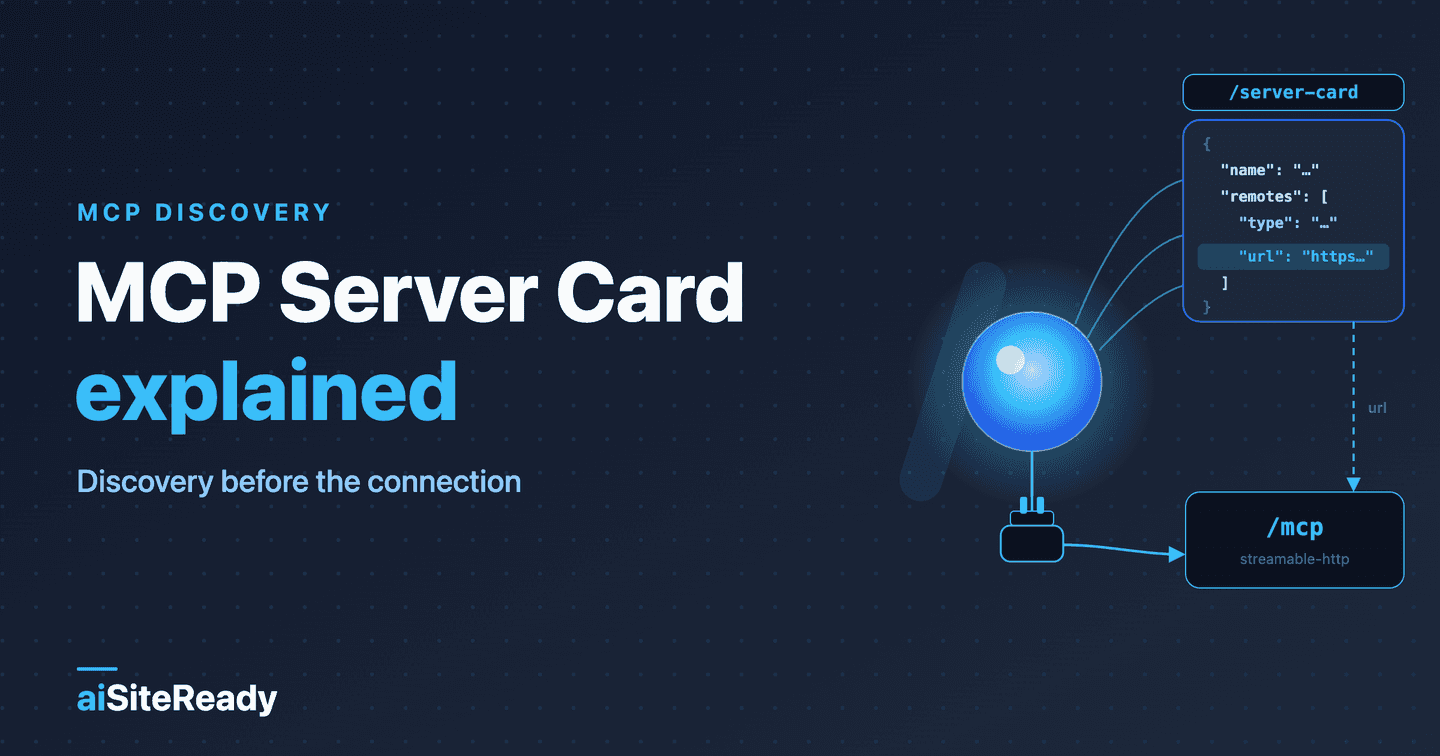
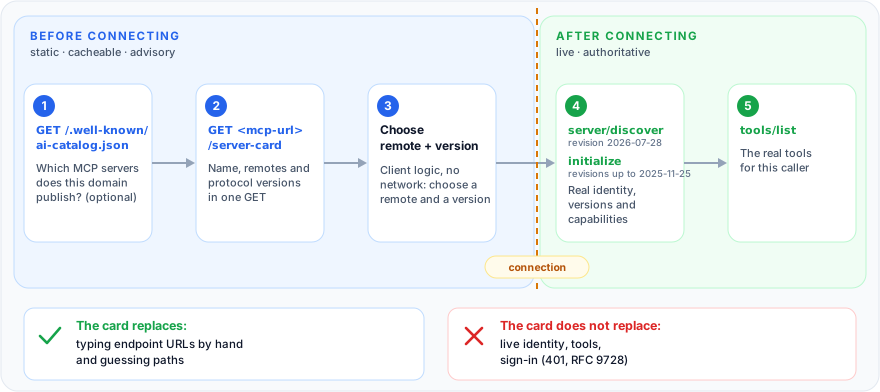
An MCP Server Card is a small public JSON document that tells a client where your remote MCP server lives and how to reach it — name, version, endpoint URL, transport, supported protocol versions — before the client opens a connection. It is discovery metadata, not a handshake: it authenticates nobody and it does not list your tools.
In the readiness stack, readable pages come first and callable surfaces sit on top. The guide to making your site agent-callable places Server Cards beside Agent Skills and A2A cards. This guide covers the card itself: each field, hosting, validation, and where it stands as a standard in October 2026. New to the base layer? Start with what AI agent readiness means.
Key takeaways
- A Server Card answers one question before any connection: where is the server and which protocol versions does it speak? Tools, capabilities, and sign-in stay in live calls (SEP-2127).
- It is not an official standard yet. SEP-2127 is an open pull request labeled
in-review, and the current spec revision, 2026-07-28, defines no card (MCP versioning).- The location has moved. The current draft recommends
<mcp-url>/server-cardplus an AI Catalog at/.well-known/ai-catalog.json; older drafts used/.well-known/mcp/server-card.json, which scanners, ours included, still probe.- The draft schema requires
$schema,name,version, anddescription; to be useful, add aremotesentry with an absoluteurl(schema.json).- aiSiteReady's
mcp_server_cardcheck reads both the draft and the legacy card shapes, at the legacy.well-knownpaths, at/server-card, and through an AI Catalog, but it never opens an MCP session, so test the endpoint yourself withcurl.
What problem does an MCP Server Card solve?
It lets a client learn about a remote MCP server without already knowing where to connect. Today a person pastes an endpoint URL into a client's config. With a card, a client, IDE, or crawler reads one static document, shows the name, picks a transport, checks protocol versions, and only then connects. The SEP names autoconfiguration, crawling domains for servers, and showing metadata without opening each endpoint as use cases (SEP-2127).
The card is deliberately small. This table shows what it carries and what must stay live.
| Question a client asks | In the card? | Authoritative answer |
|---|---|---|
| Where is the server, over which transport? | Yes, remotes[] | The connection itself |
| Which protocol versions? | A hint, supportedProtocolVersions | server/discover (2026-07-28) or initialize (earlier) |
| Name, version, description? | Yes, advisory | Identity reported at runtime |
| Which tools, resources, prompts? | No, by design | tools/list, resources/list, prompts/list |
| Who may call, how do I sign in? | No | 401 plus WWW-Authenticate and RFC 9728 metadata |
Tools are left out on purpose: a static document can't describe a surface that varies by user, session, and feature flags (SEP-2127). Even the fields a card carries are advisory. Clients must not use them for access-control decisions and should prefer live values when the two disagree (discovery.md).
The handshake changed too. Revision 2026-07-28 removed initialize and protocol-level sessions; every request carries its protocol version, and server/discover is a mandatory RPC that clients may call first (changelog). Servers on 2025-11-25 and earlier still open with initialize, and a card's supportedProtocolVersions shows which era a client will meet.
When I built aiSiteReady's card, the cheapest green check was a static card pointing at any well-formed URL, because the scanner checks the card's shape, not a handshake. I rejected that (an architecture decision record in the project explains why). An MCP endpoint must speak JSON-RPC and our REST API doesn't, so the card would have advertised an endpoint no MCP client could use.
Instead I shipped a real MCP server with one tool, scan_url, at /api/mcp and pointed the card at it. While I was writing this guide, I found that production rejected every public request to it with 421, and the card passed anyway. That bug is fixed now; the story is below.
Is the MCP Server Card an official standard yet?
No. As of 2 October 2026 it is a proposal in review: not in the MCP core specification and not registered with IANA.
- Proposal. SEP-2127, an Extensions-track pull request opened on 21 January 2026 to continue SEP-1649, has carried the
in-reviewlabel since 7 August and was still open when I checked on 2 October (pull request). The SEP file on its branch already says "Final", but nothing has merged. - Schema. It lives in a repository renamed from
experimental-ext-server-cardtoext-server-card, whose README still calls the work experimental and not an accepted MCP extension (repository). - Core spec. Revision 2026-07-28 is current (versioning). It defines no card, and the roadmap, updated on 22 August 2026, doesn't list Server Cards among its five priorities (roadmap).
- SDKs. The Python and Go pull requests the SEP cites as reference implementations were both still open (python-sdk #2951, go-sdk #1024). Don't assume a given client reads cards.
- IANA. The well-known URI registry, updated 16 September 2026, has
agent-card.json,api-catalog, andoauth-protected-resource, but nothing formcp,ai-catalog, orserver-card(IANA).
Where should an MCP Server Card live?
The drafts also disagree on where the card lives.
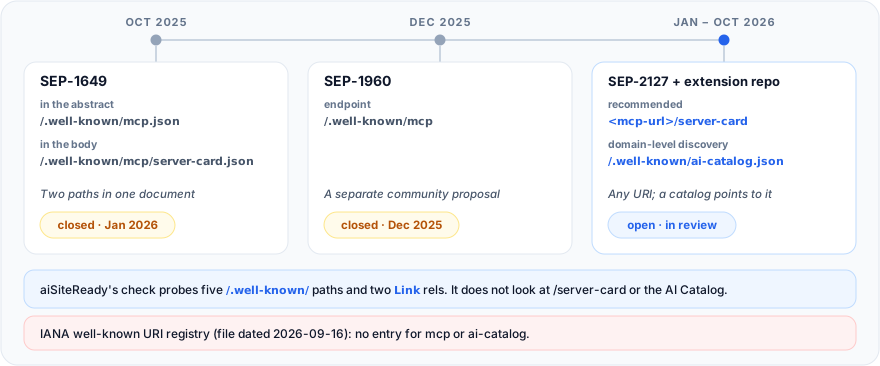
SEP-1649 itself named two paths, /.well-known/mcp.json in its abstract and /.well-known/mcp/server-card.json in its body (SEP-1649). SEP-1960 wanted /.well-known/mcp and was closed a day after it opened (SEP-1960).
The current draft drops .well-known for the card itself: any unreserved URI is valid, <streamable-http-url>/server-card is recommended, and clients find it through an AI Catalog. Its reasoning is that .well-known is for site-wide metadata, a card describes one application, and the catalog already supplies the URL (discovery.md). The catalog is a draft too (ai-catalog.io).
Publishers are split too. On 2 October 2026, https://github.com/.well-known/ai-catalog.json listed one application/mcp-server-card+json entry pointing at https://api.githubcopilot.com/mcp/server-card, a card that validates against the experimental schema, while nuxt.com still serves the older serverInfo plus endpoints shape at /.well-known/mcp/server-card.json. These are my curl observations, not a survey.
My recommendation, a judgment call and not part of any draft: publish at the draft's location with a catalog entry, and mirror the file at /.well-known/mcp/server-card.json. The mirror costs one static file and keeps today's scanners and older clients working.
What fields does a valid MCP Server Card contain?
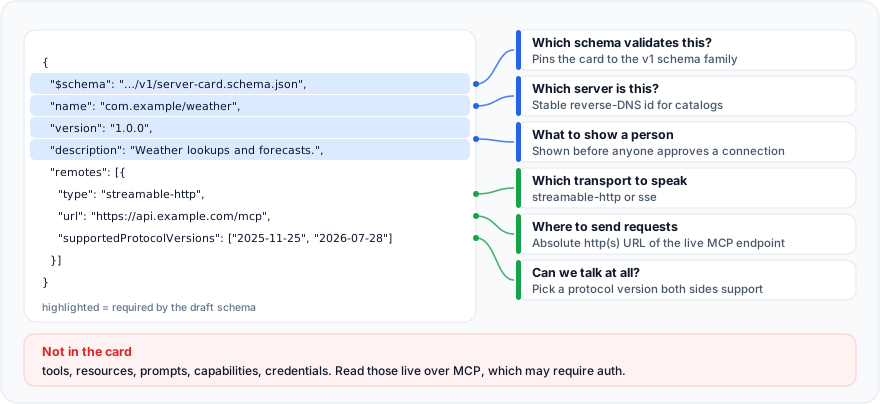
A valid card needs four fields, $schema, name, version, and description, plus, in practice, a remotes entry with a type and an absolute url. The last column shows what aiSiteReady's check does with each field as of October 2026.
| Field | Required | What a client does with it | aiSiteReady check |
|---|---|---|---|
$schema | Yes | Names the card format (the v1 schema URL) | Not required; together with remotes[] it marks the draft shape |
name | Yes | Stable id, reverse-DNS, one slash: com.example/weather | Must be non-empty; the draft's one-slash pattern and a dotted reverse-DNS name both count; legacy shapes: any name |
version | Yes | Server version, semver recommended | Not required |
description | Yes, 1–100 characters | One line shown to people | Needed to recognize the shape when $schema is absent; over 100 characters still passes |
title, websiteUrl, icons, repository | No | Display name, homepage, icons, source | Ignored |
remotes[] | No, but needed to connect | The endpoints to connect to | Each url, resolved against the card's URL, must be a well-formed absolute URL; zero remotes still passes |
remotes[].type | Yes, in a remote | streamable-http or sse | Recorded; unknown types noted, not failed |
remotes[].url | Yes, in a remote | Absolute http(s) URL or a {variable} template | Relative is resolved and accepted; a {variable} template is accepted as written; localhost, a single-label host, or a port other than 80 or 443 gives PARTIAL |
remotes[].supportedProtocolVersions | No | Lets the client pick a version before connecting | Read; a value that isn't a YYYY-MM-DD date gives PARTIAL |
remotes[].headers, remotes[].variables, _meta | No | Headers to send, user-supplied values, vendor extensions | Ignored |
The list comes from the draft's schema.json. One quirk: the $schema URL it requires returned 404 on 2 October, so treat it as an identifier and validate against #/$defs/ServerCard inside the schema file. The file has no root schema, so a validator pointed at it as-is accepts any JSON.
The smallest valid card has just the four required fields. It validates, but a client can't connect from it, because it names no remote.
{
  "$schema": "https://static.modelcontextprotocol.io/schemas/v1/server-card.schema.json",
  "name": "com.example/weather",
  "version": "1.0.0",
  "description": "Weather lookups and forecasts."
}
A useful card adds the remote and a protocol-version hint, so the client can decide before it connects.
{
  "$schema": "https://static.modelcontextprotocol.io/schemas/v1/server-card.schema.json",
  "name": "com.example/weather",
  "version": "1.0.0",
  "description": "Weather lookups and forecasts.",
  "title": "Example Weather",
  "websiteUrl": "https://example.com",
  "remotes": [
    {
      "type": "streamable-http",
      "url": "https://api.example.com/mcp",
      "supportedProtocolVersions": ["2025-11-25", "2026-07-28"]
    }
  ]
}
Both documents pass #/$defs/ServerCard from the draft's schema.json in a JSON Schema 2020-12 validator.
Where the draft and the scanner differ, the check is more lenient on content and wider on location. As of October 2026 it recognizes five card shapes:
- the current draft, which the check labels
server_card_v1; - the
serverInfoplusendpoints[]list of an earlier draft, which nuxt.com serves; - the
serverInfoplustransportform of SEP-1649; - the
mcp_versionplusendpointsobject of SEP-1960; - a docs-platform discovery document.
The serverInfo plus endpoints[], SEP-1649, and SEP-1960 shapes are still accepted, but the report's evidence flags them as legacy. A draft-shaped card without $schema or version, or with a description over 100 characters, still passes. The check lists each deviation from the draft schema in the evidence and leaves the status alone, because the shape is still a draft.
Until 4 October 2026 my own card used the earlier serverInfo plus endpoints[] shape. It scored a clean pass in aiSiteReady's check but failed the experimental schema, for four reasons:
- it had no
$schemaorversion; - its name had no slash;
- its description ran to 269 characters;
- it carried a
toolslist, which the draft leaves out on purpose.
That was the price of building to the scanner's tolerance instead of the draft. The card now uses the current shape. This is the full production document:
curl -sS https://www.ai-siteready.com/.well-known/mcp/server-card.json
{
  "$schema": "https://static.modelcontextprotocol.io/schemas/v1/server-card.schema.json",
  "name": "com.ai-siteready/aisiteready",
  "title": "aiSiteReady",
  "description": "Scan a public URL for AI-agent readiness and get a scored, actionable report.",
  "version": "0.1.0",
  "websiteUrl": "https://www.ai-siteready.com/",
  "remotes": [
    {
      "type": "streamable-http",
      "url": "https://www.ai-siteready.com/api/mcp/",
      "supportedProtocolVersions": [
        "2025-06-18"
      ]
    }
  ]
}
It passes #/$defs/ServerCard, and a unit test validates it against a vendored copy of the schema, so a change that breaks conformance fails CI. The check still scores it pass, as server_card_v1 with no deviations.
There is one part of my own recommendation I haven't followed yet. As of October 2026 the card lives only at the legacy path, with no /api/mcp/server-card and no AI Catalog, so a client that follows the current draft won't find it.
How do you host a Server Card and link it to the real MCP endpoint?
Serve it as a static, public GET over HTTPS with a JSON media type, open CORS, and cache validators, and put the real endpoint in remotes[].url as an absolute URL. The draft asks for the following (discovery.md).
- Media type.
application/mcp-server-card+jsonwherever the card is hosted; clients should send it inAccept. aiSiteReady's check acceptsapplication/jsonand any+jsontype, and flags anything else as PARTIAL. - CORS.
Access-Control-Allow-Origin: *, withGETallowed andETagexposed, so browser clients can read it. That is safe because a card is public and read-only. - Caching.
Cache-Control: public, max-age=3600, anETag, and304 Not ModifiedonIf-None-Match. - Transport. HTTPS in production, plain HTTP for local development only, and rate limiting on the endpoint.
For a static file, nginx can do all of it. Note that add_header in a location replaces inherited ones by default, and without always it is skipped on error responses (nginx docs). A static location also answers a CORS preflight OPTIONS with 405, so the last line returns 204 instead.
location = /mcp/server-card {
    alias /srv/mcp/server-card.json;
    default_type application/mcp-server-card+json;
    add_header Access-Control-Allow-Origin  "*" always;
    add_header Access-Control-Allow-Methods "GET" always;
    add_header Access-Control-Allow-Headers "Content-Type, If-None-Match" always;
    add_header Access-Control-Expose-Headers "ETag" always;
    add_header Cache-Control "public, max-age=3600" always;
    if ($request_method = OPTIONS) { return 204; }
}
aiSiteReady serves its card from a small Nitro route, so the URLs follow the deploy domain. Until 4 October 2026 it set only the content type and a one-hour cache. Since then it has followed the draft's hosting rules:
MCP_SERVER_CARD_CORS_HEADERSholds the CORS headers listed above;- the cache lasts an hour;
- the
ETagturns a matchingIf-None-Matchinto a304; - a client that asks for
application/mcp-server-card+jsongets that media type, and each media type has its ownETag.
A separate OPTIONS route answers the CORS preflight. This is the real handler as it stood in October 2026, trimmed:
export default defineEventHandler((event) => {
  const config = useRuntimeConfig(event);
  const siteUrl = typeof config.public.siteUrl === "string" ? config.public.siteUrl : "";
  const contentType = pickMcpServerCardContentType(getRequestHeader(event, "accept"));
  const { body, etag } = getMcpServerCardRepresentation(siteUrl, contentType);

  setResponseHeaders(event, MCP_SERVER_CARD_CORS_HEADERS);
  setResponseHeader(event, "Cache-Control", MCP_SERVER_CARD_CACHE_CONTROL);
  setResponseHeader(event, "ETag", etag);
  setResponseHeader(event, "Content-Type", contentType);
  setResponseHeader(event, "Vary", "Accept");

  if (ifNoneMatchMatches(getRequestHeader(event, "if-none-match"), etag)) {
    setResponseStatus(event, 304);
    return "";
  }
  return body;
});
That siteUrl matters more than it looks, because every URL in the card must be absolute and public. Without the public site URL, as on a developer machine, my buildMcpServerCard function falls back to the dev origin, so the endpoint points at localhost on port 5173.
The scanner runs card URLs through the normalizer it uses for scan targets, which rejects single-label hosts and ports other than 80 or 443. So on localhost the check can only reach PARTIAL; in production, with NUXT_PUBLIC_SITE_URL set, it passes.
The card is only as good as the endpoint behind it. The real server is configured stateless with plain JSON responses, so there is no session to keep and no event stream for a proxy to buffer:
mcp = FastMCP(
    name=MCP_SERVER_NAME,
    instructions=_MCP_INSTRUCTIONS,
    stateless_http=True,
    json_response=True,
    streamable_http_path="/",
    transport_security=build_transport_security(settings),
)
application.mount("/api/mcp", mcp.streamable_http_app())
The last argument wasn't there at first, and that caused the 421 described below.
A bare /api/mcp answers 307 and redirects to /api/mcp/, so the card advertises the slash form and clients skip the redirect.
What are the security limits of a Server Card?
A Server Card is public, advisory, and unauthenticated: it must hold no secrets, can be stale or forged, and grants no access.
- It is public. No credentials, tokens, internal topology, or private endpoints (discovery.md).
- It is advisory. A stale or forged card can steer a client to the wrong server before it sees live values, so keep it accurate.
- It carries no authentication. A protected MCP server must implement OAuth Protected Resource Metadata (RFC 9728) and point clients to it, through
resource_metadatain theWWW-Authenticateheader of a401or at the well-known URI (MCP authorization). The card'sheadersfield only describes headers; it grants nothing. See OAuth discovery for AI agents.
How does a Server Card relate to A2A cards, Agent Skills, and the API catalog?
They complement each other: each document answers one question at its own location. The card says where the MCP server is; the others say what else you publish, how to use it, and how to get in.
| Document | Question it answers | Location | Status |
|---|---|---|---|
| MCP Server Card | Where is the MCP server? | Any URI; <mcp-url>/server-card recommended | Draft, not in IANA |
| AI Catalog | Which agent-facing artifacts does this domain publish? | /.well-known/ai-catalog.json | Draft, not in IANA |
| A2A Agent Card | Which agent do you run? | /.well-known/agent-card.json | Registered with IANA |
| API catalog | Which HTTP APIs, and where are their descriptions? | /.well-known/api-catalog | RFC 9727 |
| Agent Skills index | Which procedures should an agent follow? | /.well-known/agent-skills/index.json | Draft, not in IANA |
| Protected resource metadata | How do I get a token? | /.well-known/oauth-protected-resource | RFC 9728 |
Statuses come from the IANA registry and the Agent Skills proposal's own status line. The AI Catalog is the draft's bridge between the card and the rest of the domain, and an entry for a card is small:
{
  "specVersion": "1.0",
  "entries": [
    {
      "identifier": "urn:air:example.com:mcp:weather",
      "type": "application/mcp-server-card+json",
      "url": "https://api.example.com/mcp/server-card"
    }
  ]
}
For the neighbors, see the guides to the API catalog, Agent Skills, and OAuth discovery.
What mistakes break an MCP Server Card?
The worst mistake is a card that points at an endpoint that doesn't work, because no scanner can catch it from outside. Most broken cards fail in one of these six ways.
| Mistake | What happens | Fix |
|---|---|---|
Card advertises an endpoint that fails (404, 405, 421) | Card validates, every connection fails | Send a real request to the endpoint |
Relative remotes[].url | Draft schema wants absolute; our check resolves it and passes | Always write https:// URLs |
localhost, a single-label host, or a port other than 443 in production | Check gives PARTIAL (mcp_server_card_invalid); private IPs and internal hostnames still pass | Set the public site URL; fail the deploy without it |
Wrong content type, or an HTML fallback page with 200 | PARTIAL (mcp_server_card_wrong_content_type), or no card at all | Serve JSON; return 404 for unpublished paths |
| Tool list or capabilities inside the card | Drifts from the live server | Let clients call tools/list |
| Only the legacy path, or only the new one | Invisible to half of clients and scanners | Publish at /server-card with a catalog entry; mirror the old path |
I hit the first row on my own deployment while writing this guide. On 2 October 2026 the card on www.ai-siteready.com passed aiSiteReady's check, but a tools/list POST to the advertised endpoint returned 421 Invalid Host header. That is what the official Python SDK returns when its DNS-rebinding protection is on and the Host header isn't allow-listed.
The SDK (python-sdk 1.x) enables that protection automatically when FastMCP keeps its default host of 127.0.0.1, and then allows only localhost hosts (python-sdk source). My build_mcp_server set neither host nor transport_security, which matches.
The fix went to production on 4 October 2026. It passes TransportSecuritySettings explicitly and leaves the protection on, because the MCP spec requires servers to validate Origin (Streamable HTTP). For a site at www.example.com the core of it looks like this:
from mcp.server.transport_security import TransportSecuritySettings

transport_security = TransportSecuritySettings(
    enable_dns_rebinding_protection=True,
    allowed_hosts=["localhost", "localhost:*", "www.example.com", "www.example.com:*"],
    allowed_origins=["http://localhost:*", "https://www.example.com"],
)
List each host twice. The SDK's host:* pattern matches only a Host header that carries a port, and nginx's proxy_set_header Host $host forwards the bare name. Clients outside a browser send no Origin header, and the SDK doesn't reject them for that.
After the deploy, initialize and tools/list answered 200 through the public proxy, a foreign Host still got 421, and a foreign Origin got 403. The deploy now fails unless a real initialize sent through the public URL returns 200 with the server's name.
The scanner never calls the endpoint, so it can't catch this; hence the next section.
How do you verify your card with curl and jq?
Check three things in order: the card's headers, its fields, and the endpoint it points to. Expect a 200, a JSON media type, and, if you followed the draft, CORS and cache validators.
CARD=https://api.githubcopilot.com/mcp/server-card
curl -sS -D - -o /dev/null -H 'Accept: application/mcp-server-card+json' "$CARD" \
  | grep -i -E '^(HTTP|content-type|access-control-allow-origin|cache-control|etag)'
On 2 October 2026 that printed a 200, application/mcp-server-card+json, access-control-allow-origin: *, a one-hour cache-control, and an etag. Then read the fields:
curl -sS "$CARD" | jq '{name, title, remotes}'
{
  "name": "io.github.github/github-mcp-server",
  "title": "GitHub",
  "remotes": [
    {
      "type": "streamable-http",
      "url": "https://api.githubcopilot.com/mcp/"
    }
  ]
}
Last, call the endpoint. A stateless server needs only a single POST; a stateful one on an older revision returns an Mcp-Session-Id from initialize, which you echo afterwards. On 2026-07-28 there is no initialize: the first request carries its protocol version in a header and in _meta. This request follows the spec's server/discover shape; I haven't run it against a live 2026-07-28 server.
URL=$(curl -sS "$CARD" | jq -r '.remotes[0].url')
curl -sS -X POST "$URL" \
  -H 'Content-Type: application/json' \
  -H 'Accept: application/json, text/event-stream' \
  -H 'MCP-Protocol-Version: 2026-07-28' \
  -H 'Mcp-Method: server/discover' \
  -d '{"jsonrpc":"2.0","id":1,"method":"server/discover","params":{"_meta":{"io.modelcontextprotocol/protocolVersion":"2026-07-28","io.modelcontextprotocol/clientInfo":{"name":"curl","version":"0"},"io.modelcontextprotocol/clientCapabilities":{}}}}'
Expect a JSON-RPC result with supportedVersions, or an UnsupportedProtocolVersionError listing the versions the server does speak (server/discover).
Then put the routine in CI. The script treats 200, 400, and 401 as "endpoint alive" (an authenticated server answers 401, and a modern-only server may answer 400 to a bare tools/list) and any other status, such as 404, 405, 421, or 5xx, as failure. In October 2026 it passed GitHub's card. Before 4 October it failed ours at the field check, because ours used the legacy shape, and the endpoint step would have caught the 421 next. After both fixes, ours passes too.
#!/usr/bin/env bash
set -euo pipefail
CARD="${1:?usage: check-card.sh https://api.example.com/mcp/server-card}"

HEADERS="$(curl -sS -D - -o /dev/null -H 'Accept: application/mcp-server-card+json, application/json' "$CARD")"
grep -qE '^HTTP/[0-9.]+ 200' <<<"$HEADERS" || { echo 'FAIL: card did not return 200'; exit 1; }
grep -qiE '^content-type: application/(mcp-server-card\+)?json' <<<"$HEADERS" \
  || { echo 'FAIL: Content-Type is not a JSON media type'; exit 1; }

BODY="$(curl -sS "$CARD")"
jq -e '(.["$schema"] | type == "string")
       and (.name | type == "string" and test("^[a-zA-Z0-9.-]+/[a-zA-Z0-9._-]+$"))
       and (.version | type == "string")
       and (.description | type == "string" and length >= 1 and length <= 100)' <<<"$BODY" >/dev/null \
  || { echo 'FAIL: $schema, name, version or description is missing or invalid'; exit 1; }
jq -e '[.remotes[]?.url] | length > 0 and all(test("^https://"))' <<<"$BODY" >/dev/null \
  || { echo 'FAIL: remotes[].url must be an absolute https URL'; exit 1; }

URL="$(jq -r '.remotes[0].url' <<<"$BODY")"
CODE="$(curl -sS -o /dev/null -w '%{http_code}' -X POST "$URL" \
  -H 'Content-Type: application/json' \
  -H 'Accept: application/json, text/event-stream' \
  -d '{"jsonrpc":"2.0","id":1,"method":"tools/list"}')"
case "$CODE" in
  200|400|401) echo "OK: card is well-formed, endpoint answered $CODE" ;;
  *)           echo "FAIL: endpoint $URL answered $CODE"; exit 1 ;;
esac
How does aiSiteReady check an MCP Server Card?
As of October 2026, aiSiteReady's mcp_server_card check, part of the Protocol/API category, looks for a card at the draft's locations and at legacy well-known paths, and validates its shape and URLs without calling the endpoint.
It requests five well-known paths (/.well-known/mcp, /.well-known/mcp/server-card.json, /.well-known/mcp.json, /.well-known/mcp-server.json, /.well-known/mcp/server.json) and reads the root Link header for the mcp-server and mcp-server-card relations, which are the scanner's own tolerance, not something I found in the MCP drafts. It also treats the scanned URL as the MCP URL and requests it with /server-card appended. Then it reads /.well-known/ai-catalog.json, using inline cards and fetching up to five application/mcp-server-card+json entries. Scanning https://example.com/ therefore tries https://example.com/server-card. A card at https://api.example.com/mcp/server-card is found through the catalog, or by scanning https://api.example.com/mcp itself.
Requests go through the SSRF-safe fetcher, run no JavaScript, and never fetch the endpoint URLs inside the card.
PASS means a valid card with no soft issues. PARTIAL means a card exists but is incomplete, has the wrong content type, has a non-date protocolVersion or supportedProtocolVersions entry, or carries an endpoint URL the scanner's URL normalizer rejects, such as a single-label host like localhost or a port other than 80 or 443. The draft's {variable} templates are accepted as written. UNKNOWN means a bot block or fetch failure stopped the read. FAIL means no card was found.
PASS, PARTIAL, and FAIL score 1.0, 0.5, and 0 at medium severity; the whole category is off for the Content site profile and weighs more under the API/Application profile. The weights are on the methodology page, and the 30-minute readiness audit shows where this check fits in a full pass.
Run a free scan to see which shape your card takes, whether the URLs inside it are well-formed absolute URLs, and which fixes come first, in English, Ukrainian, or Russian.
The short version: an MCP Server Card is a public, advisory pointer that says where your server is and which versions it speaks, then gets out of the way. It is still a draft, so publish it where the draft says, mirror it where scanners look, keep every URL absolute and public, and test the endpoint behind it with a real request, because nothing else will.
IMozz has 20 years in software development, with the past year spent building with LLMs. He builds aiSiteReady, a read-only scanner that checks whether AI agents can read and call a site. It server-renders its own content as a working example.