Control AI crawlers in robots.txt: GPTBot, ClaudeBot & more
Exact robots.txt rules for GPTBot, ClaudeBot, PerplexityBot, Google-Extended, CCBot. Copy-paste allow, block, and selective snippets, plus a free 0–100 scan.
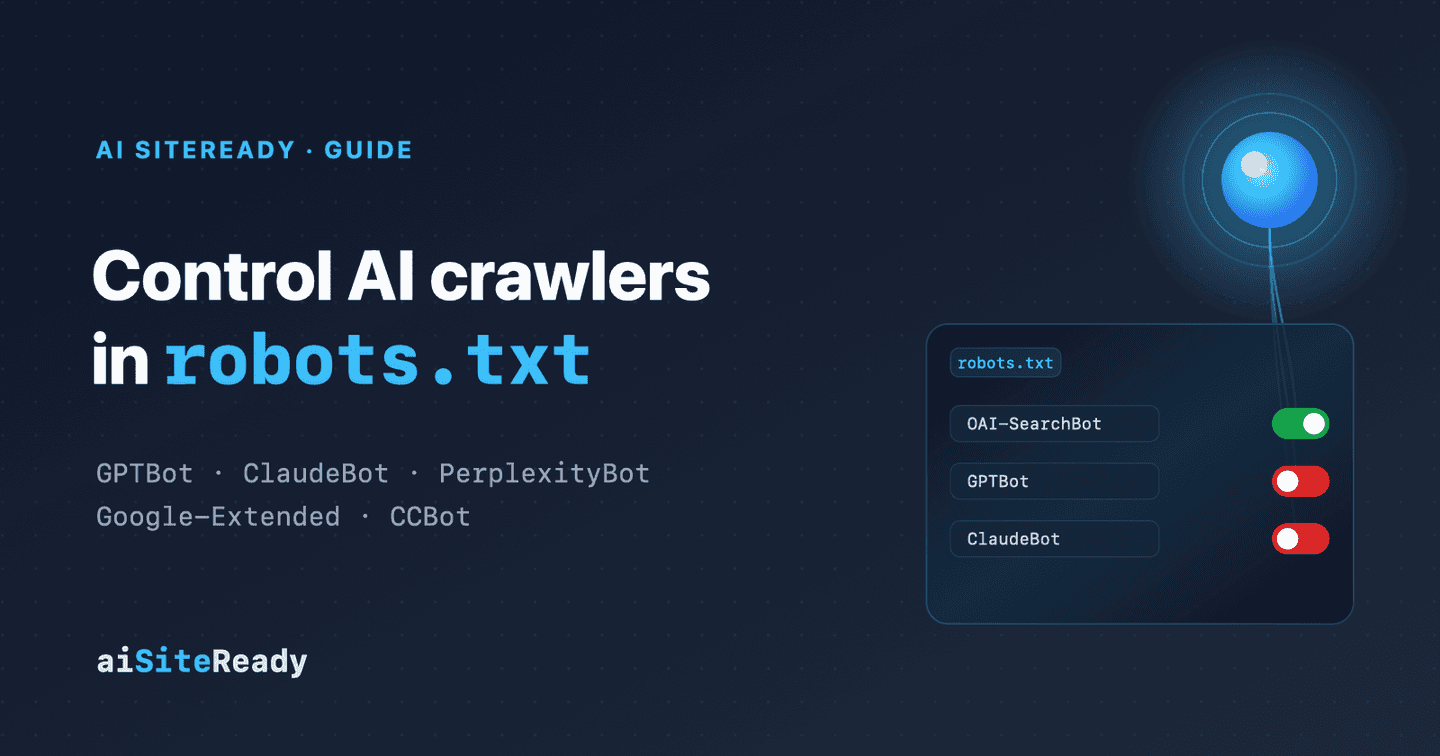
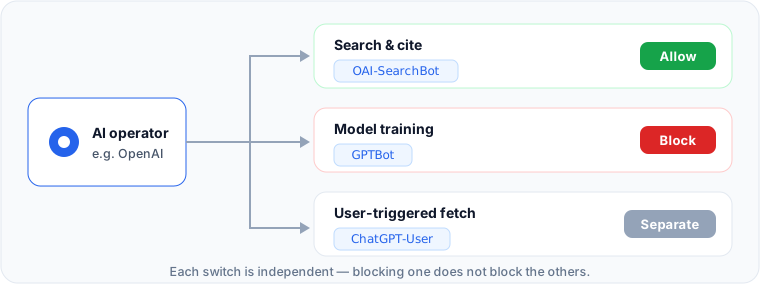
AI crawlers are not one on/off switch. They are a permission matrix. Major operators split their bots into separate jobs: one for search and citation, one for model training, and one for user-triggered fetches. Blocking a single name usually does not block all AI access. The practical question is not "which bot do I block?" but "which function do I want to allow?"
That distinction is the whole game. You can stay visible in AI search while opting out of training. You can allow ordinary search engines but keep your content out of the open Common Crawl corpus. You can leave Google Search untouched and still tell Google not to train Gemini on your pages. Get the bot names right and robots.txt becomes a governance tool, not a blunt instrument.
Key takeaways
- AI bots are split by function. OpenAI runs
OAI-SearchBot(search),GPTBot(training), andChatGPT-User(user fetch); Anthropic runsClaude-SearchBot,ClaudeBot, andClaude-User; Perplexity runsPerplexityBotandPerplexity-User.Google-Extendedis not a crawler. It is arobots.txttoken that controls Gemini training and grounding, and it has no effect on Google Search inclusion or ranking.- The
robots.txttoken (the name afterUser-agent:) is what you control, not the full HTTP header likeGPTBot/1.3.robots.txtgoverns crawling, not indexing. To keep a page out of results, usenoindex, and don't also block it inrobots.txt, or the bot never sees the directive.- User-triggered fetchers (
Perplexity-User,ChatGPT-User) may ignorerobots.txt. After you edit your rules, scan your domain 0–100 to confirm what each AI bot can actually do.
What are the AI crawler user-agents, and who runs them?
When people search for "exact user-agents," what they usually need is the robots token: the canonical name you put after User-agent:. The full HTTP header often carries a version (GPTBot/1.3, OAI-SearchBot/1.3, CCBot/2.0), but in robots.txt you match the token, not the whole string. Google-Extended has no HTTP header at all.
Here is the map for the ten user-agents, across five operators, that people search for most:
| User-agent (robots token) | Operator | What it does | Blocking it means |
|---|---|---|---|
OAI-SearchBot | OpenAI | Surfaces and links your pages in ChatGPT search | You drop out of ChatGPT search answers |
GPTBot | OpenAI | Collects content that may train foundation models | You opt out of OpenAI model training |
ChatGPT-User | OpenAI | Fetches a page when a user asks ChatGPT to | robots.txt may not apply to this |
ClaudeBot | Anthropic | Collects public web content for model improvement | Future pages are excluded from training sets |
Claude-SearchBot | Anthropic | Improves search result quality inside Claude | Lower visibility in Claude's search answers |
Claude-User | Anthropic | Fetches a page for a user's Claude request | Claude can't pull your page on request |
PerplexityBot | Perplexity | Surfaces and links your site in Perplexity search | You drop out of Perplexity results |
Perplexity-User | Perplexity | User-triggered fetch (generally ignores robots.txt) | Often unaffected by robots.txt |
Google-Extended | Token: allow content for Gemini training/grounding | You opt out of Gemini training; no Search effect | |
CCBot | Common Crawl | Crawls for the open Common Crawl web archive | You stay out of the open dataset |
Two operators deserve a closer look. OpenAI is explicit that GPTBot is a training crawler, OAI-SearchBot serves ChatGPT Search, and ChatGPT-User is a user action rather than an automatic crawl. For those user-initiated requests, OpenAI notes that robots.txt may not apply (OpenAI). Anthropic mirrors that split. Its bots honor robots.txt and even support the non-standard Crawl-delay directive (Anthropic). Perplexity says PerplexityBot is for search and is not used to crawl content for AI foundation models, while Perplexity-User is the user-triggered fetcher that generally ignores robots.txt (Perplexity).
Google-Extended is the odd one out. Google states plainly that it is not a separate crawler and has no HTTP request user-agent of its own. The actual crawling is done by existing Google bots, and Google-Extended is only a token that controls whether already-crawled content may be used to train future Gemini models and for grounding in Gemini Apps and Vertex AI (Google). CCBot, meanwhile, belongs to Common Crawl, a non-profit that maintains an open, publicly available repository of web crawl data (Common Crawl).
What robots.txt rules allow or block AI crawlers?
Treat the snippets below as explicit policy statements, not minimal config. By default crawling is allowed even with no rule, but listing names plainly is far easier to audit, and machine checks like aiSiteReady look for exact rules per bot. The file must live at the root of the host (https://example.com/robots.txt), not in a subdirectory.
Allow all the main AI bots
User-agent: GPTBot
Allow: /

User-agent: OAI-SearchBot
Allow: /

User-agent: ClaudeBot
Allow: /

User-agent: Claude-SearchBot
Allow: /

User-agent: PerplexityBot
Allow: /

User-agent: Google-Extended
Allow: /

User-agent: CCBot
Allow: /
Block all the main AI bots
User-agent: GPTBot
Disallow: /

User-agent: OAI-SearchBot
Disallow: /

User-agent: ClaudeBot
Disallow: /

User-agent: Claude-SearchBot
Disallow: /

User-agent: PerplexityBot
Disallow: /

User-agent: Google-Extended
Disallow: /

User-agent: CCBot
Disallow: /
This blocks only the named tokens. It is not a site-wide User-agent: * block, so other crawlers are untouched.
Allow AI search, block training
This is the strongest, most realistic policy: stay citable in ChatGPT, Claude, and Perplexity search, but keep your content out of training corpora.
# Opt out of training + the open dataset
User-agent: GPTBot
Disallow: /

User-agent: ClaudeBot
Disallow: /

User-agent: Google-Extended
Disallow: /

User-agent: CCBot
Disallow: /

# Stay visible in AI search
User-agent: OAI-SearchBot
Allow: /

User-agent: Claude-SearchBot
Allow: /

User-agent: PerplexityBot
Allow: /
These rules decide who may fetch your pages. To also say what a crawler may do with content it has fetched, for example "search yes, training no", add a Content-Usage rule in robots.txt or an HTTP header.
Throttle instead of block
If you only want to slow down Anthropic rather than block it, there is a middle option, because Anthropic documents support for Crawl-delay (Anthropic):
User-agent: ClaudeBot
Crawl-delay: 1
For an API, advertise the quota itself in a response header: see RateLimit-Policy headers for AI agents.
Why robots.txt can't control indexing or user fetches
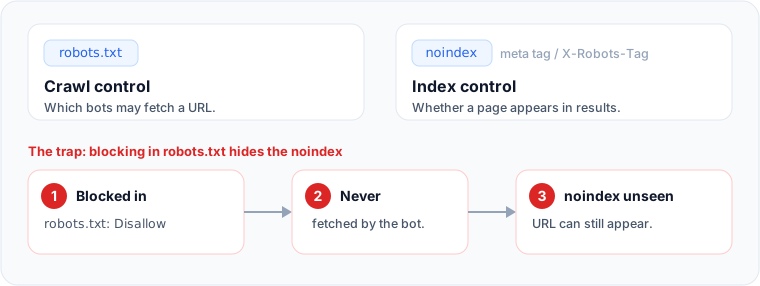
The most common mistake here is confusing crawl control with index control. Google is explicit that robots.txt manages crawler traffic and is not a mechanism for keeping a page out of its index. A blocked URL can still appear in results if other sites link to it (Google). RFC 9309, the standard behind robots.txt, is not an access-authorization mechanism either (RFC 9309). In short: robots.txt is a policy file for well-behaved crawlers, not a lock on private content.
If your goal is "let bots crawl, but don't index or snippet this," you need a page-level or response-level directive. Use a noindex meta tag for HTML pages, or the X-Robots-Tag header for PDFs, images, and other non-HTML files:
<meta name="robots" content="noindex">
X-Robots-Tag: noindex
There is one trap worth repeating: for noindex to work, the crawler must be able to see it. If the same URL is blocked in robots.txt, the bot never fetches the page and never reads the directive, so the page can still surface. Google also says noindex inside robots.txt is unsupported (Google). The same logic applies to AI search. OpenAI advises publishers to use noindex if they don't want even a link surfaced, and the crawler has to be able to read it (OpenAI).
Then there are user-triggered fetchers. Claude-User sits inside Anthropic's robots.txt-respecting model, but OpenAI warns that robots.txt may not apply to ChatGPT-User, and Perplexity says Perplexity-User generally ignores it because the fetch was initiated by a person. If your real goal is to stop live fetches on user prompts, robots.txt alone won't do it. You'll usually need a WAF, auth, or network-layer control.
What do you actually give up by blocking?
Blocking a training bot buys you control without necessarily costing discoverability, if you keep the functions separate. OpenAI splits GPTBot from OAI-SearchBot, Anthropic splits ClaudeBot from Claude-SearchBot, and Perplexity is clear that PerplexityBot powers search, not training. So the editorial stance "don't train on our new work, but keep citing us" maps to selective rules, not a total block.
The most counterintuitive case is Google. Because Google-Extended doesn't affect Search inclusion or ranking, and AI Overviews and AI Mode draw on pages that are already indexed and snippet-eligible, blocking Google-Extended should not drop you from AI Overviews. What actually governs that surface is ordinary Search hygiene: indexability, snippet eligibility, and not carrying a noindex (Google).
CCBot is a different lever again. Blocking it isn't really about whether a chatbot cites you today. It's about whether your site enters the open Common Crawl corpus and its downstream reuse. Common Crawl publishes a simple opt-out (User-agent: CCBot + Disallow: /) and documents that it is an open dataset, so treat the decision as one about open data, not one specific assistant (Common Crawl).
How do you verify your rules?
Three mechanical facts trip people up. First, robots.txt applies only to its exact host, protocol, and port. Every subdomain needs its own file, and Anthropic explicitly asks you to opt out per subdomain. Second, changes aren't instant: OpenAI and Perplexity cite lags of up to about 24 hours, and Google caches robots.txt for around a day. Third, the User-agent string is trivially spoofed, so Google and Common Crawl both recommend verifying request authenticity with reverse DNS and published IP ranges rather than trusting the header (Common Crawl).
Auditing all of this by hand, across every subdomain and on every release, doesn't scale. That's what aiSiteReady does: it fetches your domain the way an agent would, reads your robots.txt access policy for AI crawlers, and checks the exact rules for GPTBot, ClaudeBot, and PerplexityBot. This maps directly to the Bot Governance category, one of roughly 15 to 20 checks spanning Discoverability, Content Accessibility, Bot Governance, Protocol/API, and Commerce that combine into an Agent Readiness Score from 0 to 100. The exact checks and weights live on the methodology page. For the bigger picture, see what AI agent readiness means. For the content layer behind a passing scan, see how to make a JavaScript site readable to AI and what llms.txt is.
After you edit robots.txt, run a free scan: you'll see exactly which AI bot rules the scanner found for GPTBot, ClaudeBot, and PerplexityBot, where your site is still partly closed to AI search, and a developer-ready task instead of abstract advice, in English, Ukrainian, or Russian. The score is a readiness diagnostic, not a ranking guarantee.
IMozz has 20 years in software development, with the past year spent building with LLMs. He builds aiSiteReady, a read-only scanner that checks whether AI agents can read a site. It server-renders its own content as a working example.