Markdown for Agents without Cloudflare: nginx, Nuxt, Next.js
Serve Markdown to AI agents without Cloudflare: an nginx map for Accept: text/markdown, Nuxt and Next.js code, Vary: Accept, and a 9-check curl test script.
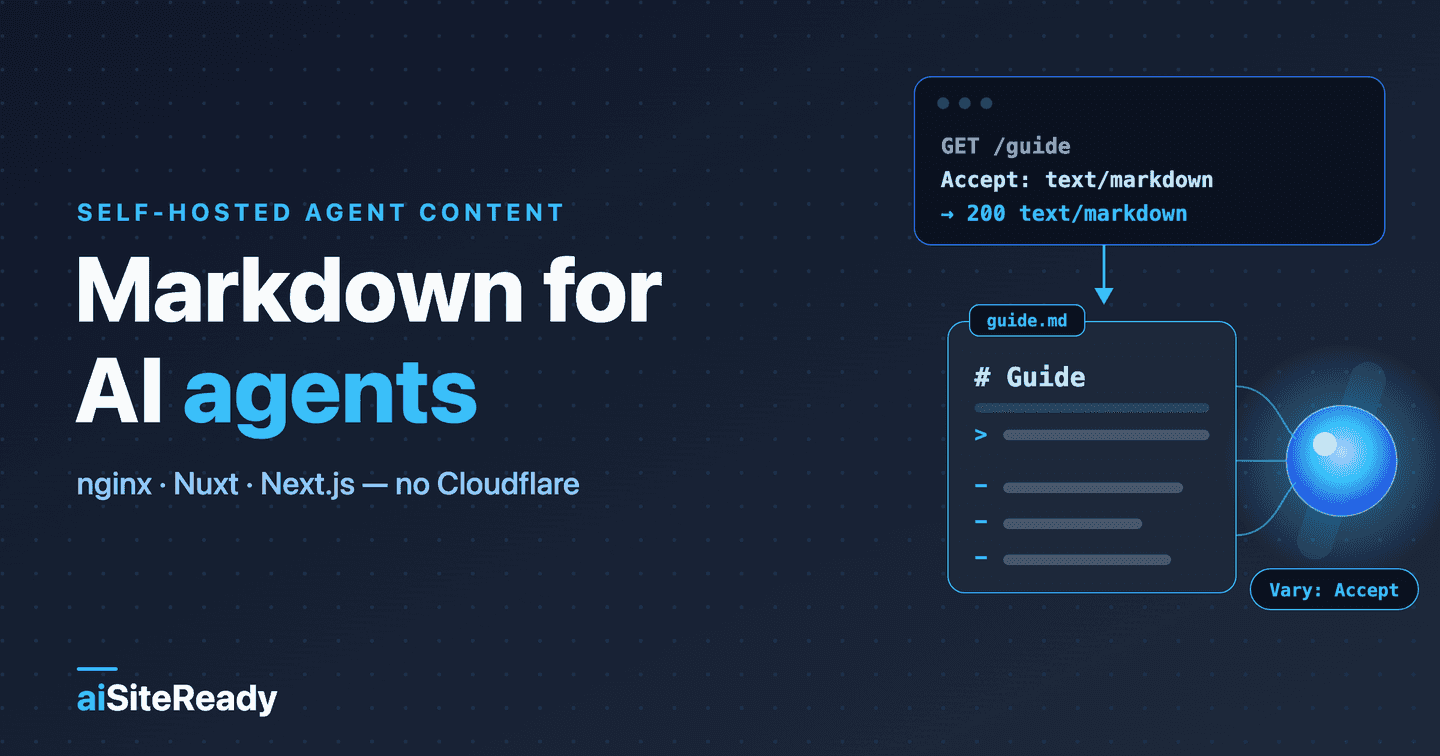
You can serve Markdown to AI agents from your own stack by doing the three things Cloudflare's managed feature does for you. Those are choosing the variant from Accept: text/markdown, producing the Markdown, and keying every cache on the variant. nginx handles the first and third in a few lines, a Nuxt or Next.js handler covers the first two, and a curl matrix proves all three.
This is the recipe book for Serve Markdown to AI agents, which covers why Markdown helps, the delivery patterns, and CDN theory. Here you get working configs, the real Nuxt middleware behind aiSiteReady, conversion options, and a regression script. It belongs to the content layer of the agent-readiness stack, assumes your facts are already in server-rendered HTML (make a JavaScript site readable), and serves what llms.txt points at.
Key takeaways
- Cloudflare's managed feature converts only HTML, on eligible plans, and caps the origin response at 2 MB (Cloudflare docs).
- Self-hosting means three jobs: a q-aware choice of variant, a source of Markdown, and a cache key that includes the variant.
- nginx can classify
Acceptwithmapbut cannot compare q-values, so the recipe is deliberately conservative (nginx docs).- aiSiteReady's own Nuxt middleware shipped on 13 June 2026: real q-value logic, GET only as of October 2026, Markdown built from the same sources as the HTML.
- Next.js 16 renamed the
middlewarefile convention toproxy(Next.js docs).
What does Cloudflare's Markdown for Agents do, and what are you replacing?
It converts your HTML to Markdown at Cloudflare's edge when a client sends Accept: text/markdown, with no change at the origin. Cloudflare announced it on 12 February 2026 (Cloudflare blog). The reference page lists Pro, Business, and Enterprise plans plus SSL for SaaS at no cost; it is switched on in the dashboard or through the API. Its stated limits: only HTML is converted, and the origin response cannot exceed 2 MB (2,097,152 bytes) (Cloudflare docs).
| Cloudflare does | You build |
|---|---|
Detects Accept: text/markdown | A q-aware check, in nginx map or app code |
| Converts HTML at the edge | Build-time export or an HTML-to-Markdown step |
Sets text/markdown; charset=utf-8 and adds Accept to Vary | The same headers, on both variants |
Adds x-markdown-tokens and x-original-tokens | Optional, and approximate either way |
Adds Content-Signal: ai-train=yes, search=yes, ai-input=yes if the origin sets none | A deliberate value, or none |
The last row matters: the managed default permits training, and it keeps your value if you set one. If you self-host, nobody writes that line for you, so choose it (content usage preferences). CDN behavior is in the earlier article; this one covers only the cache you run.
How do you serve Markdown from nginx?
Collapse the Accept header into one of two variants with map, then use that variant to pick a file or a cache key. map lives in the http context and tries its regular expressions in order; first match wins (nginx docs). It cannot compare q-values, so the rule is conservative: Markdown only when text/markdown is listed first with no parameter other than q=1. Browsers, */*, a missing header, text/markdown;q=0, and even text/markdown; charset=utf-8 all get HTML.
map $http_accept $variant {
    default "html";
    # Quoted: the pattern contains "}" and ";" (rule from the nginx rewrite module docs).
    "~*^\s*text/markdown\s*(;\s*q=1(\.0{0,3})?\s*)?(,|$)" "md";
}
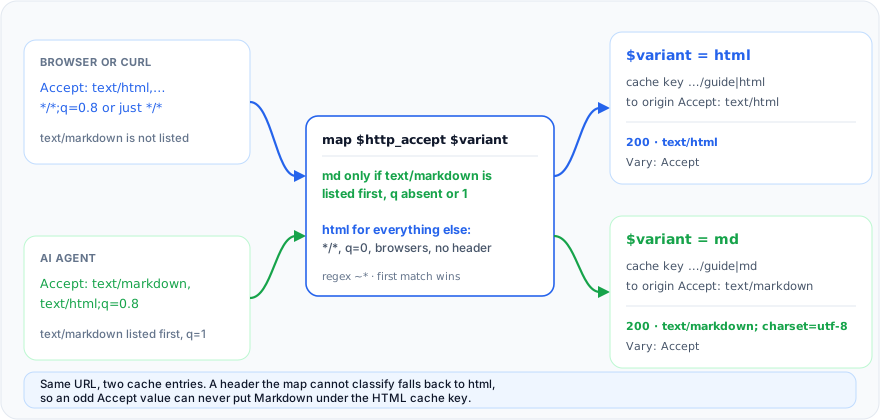
I tested both recipes in the official nginx:alpine image (nginx 1.31) on 3 October 2026: nginx -t passed, and the script below passed against Recipe A.
Recipe A: Markdown files next to each page
If your build emits index.html and index.md in every directory, nginx serves the right sibling. Put this inside http, next to the map above.
gzip on;
gzip_vary on;
gzip_types text/markdown;               # text/html is always compressed; Markdown must be listed

map $variant $index_file {
    md      "index.md";
    default "index.html";
}

server {
    listen 80;
    server_name example.com;
    root /var/www/site;

    # /guide/ becomes /guide/index.md or /guide/index.html. A missing index.md
    # falls back to the HTML page, so a negotiated URL never 404s. Assets pass
    # through here untouched: no Vary on CSS, JS or images.
    location / {
        index $index_file index.html;
        try_files $uri $uri/ =404;
    }

    # The Markdown file, requested directly or reached through the index redirect.
    location ~ \.md$ {
        types { }                                   # ignore mime.types here
        default_type text/markdown;                 # bare type, so gzip_types matches
        charset utf-8;
        charset_types text/markdown;                # charset touches listed types only
        add_header Vary Accept always;
    }

    # HTML pages: Vary, plus a pointer to the Markdown sibling.
    location ~ ^(?<dir>/(?:.*/)?)index\.html$ {
        add_header Vary Accept always;
        add_header Link "<${dir}index.md>; rel=\"alternate\"; type=\"text/markdown\"" always;
    }
}
Four details carry the recipe:
- The
indexdirective accepts variables and works by an internal redirect, so the request is processed again in whicheverlocationmatches the new URI (nginx docs). That is why the Markdownlocationsets the type. - The default
mime.typeshas nomdentry (checked in the nginx repository), sotypes { },default_type text/markdown,charset utf-8, andcharset_types text/markdownset the type and the charset in a formgzip_typesstill matches. Putting the charset insidedefault_typewould silently turn off gzip for Markdown. add_headeris inherited only when the current level defines none, so server-level headers such as HSTS must be repeated in these two locations (nginx docs).alwayskeeps the headers on a 404 for a missingindex.md. If some directories lackindex.md, drop theLinkline or emit it only where the file exists.gzip_vary onadds a secondVaryline,Accept-Encoding. TwoVarylines are legal becauseVaryis a list field, so a recipient may combine them (RFC 9110); aiSiteReady's production responses carry that pair.
Recipe B: a cache in front of an app
When nginx fronts Nuxt, Next.js, or Express, the app produces both variants and nginx only caches them apart. Use it for page routes; a JSON API location needs its own Accept.
proxy_cache_path /var/cache/nginx/pages levels=1:2 keys_zone=pages:10m
                 max_size=512m inactive=30m use_temp_path=off;

map $variant $origin_accept {
    md      "text/markdown";
    default "text/html";
}

upstream app {
    server 127.0.0.1:3000;
    keepalive 16;
}

server {
    listen 80;
    server_name example.com;

    location / {
        proxy_pass http://app;
        proxy_http_version 1.1;
        proxy_set_header Connection "";
        proxy_set_header Host $host;
        proxy_set_header Accept $origin_accept;     # the origin sees two values, not hundreds

        proxy_cache pages;
        proxy_cache_key "$scheme://$host$request_uri|$variant";
        proxy_cache_valid 200 5m;
        proxy_cache_valid 404 1m;
        proxy_ignore_headers Vary;                  # we key on $variant ourselves

        add_header X-Cache-Status $upstream_cache_status always;
    }
}
Why ignore Vary? Since nginx 1.7.7 it caches a response "taking into account the corresponding request header fields" (nginx docs), so every distinct browser Accept string would get its own entry. Keying on $variant leaves two.
The price: if your origin also varies on Cookie or Accept-Language, add those to the key or skip caching those paths. nginx passes the app's Vary through, so the app must send Vary: Accept on negotiated pages, not on assets. The default key, $scheme$proxy_host$request_uri, has no variant at all; the proxy_cache_key line is your defense against the poisoning sequence in the earlier article.
How does a Nuxt or Nitro server do it?
With one server middleware that answers only an explicit Markdown request and passes everything else to the HTML renderer. This is the real code behind aiSiteReady, added on 13 June 2026: marketing pages first, blog articles the same evening. The guards come first.
// frontend/server/middleware/markdown-negotiation.ts (excerpt, October 2026)
export default defineEventHandler(async (event) => {
  if (!isGetOrHead(event)) { // HEAD negotiates exactly like GET
    return;
  }
  if (!prefersMarkdown(getRequestHeader(event, "accept"))) {
    return;
  }
  const pathname = getRequestURL(event).pathname;
  // ...resolve the page, build the Markdown, return sendMarkdown(event, markdown)
});
Returning nothing hands the request on: h3 calls handlers in order until one returns a response (h3 docs). Nuxt's own docs describe middleware as inspect-only (Nuxt docs), so treat returning a value as h3 behavior, not a Nuxt promise, and pin it with the matrix below. The response is built in one place:
function sendMarkdown(event: H3Event, markdown: string): string {
  setResponseHeader(event, "content-type", "text/markdown; charset=utf-8");
  setResponseHeader(event, "vary", "Accept");
  setResponseHeader(event, "cache-control", "public, s-maxage=300, stale-while-revalidate=86400");
  return bodyForMethod(event, markdown); // HEAD: empty body, GET's Content-Length
}
Three choices are worth copying:
- It does not convert HTML. Marketing pages come from the same i18n catalog and page structure the Vue components use, and
@nuxt/contentstores a blog article as a parsed tree that a small serializer writes back to Markdown. One source feeds both representations, so they cannot drift. - Anything it cannot answer falls through: an unknown slug gets an honest 404 from the renderer, and a failed content query serves HTML, not a 500.
Varyon the HTML variant comes from the route rules, since SSR renders that response after the middleware steps aside.
// frontend/nuxt.config.ts (excerpt: the route rule shared by marketing pages and blog articles)
headers: {
  "Cache-Control": "public, s-maxage=300, stale-while-revalidate=86400",
  "Vary": "Cookie, Accept-Language, Accept",
},
The HEAD branch is first-hand too. The first version guarded on GET alone and sent HEAD requests to the HTML renderer: on 2 October 2026, curl -I -H 'Accept: text/markdown' against an aiSiteReady article returned text/html headers, while the same request with GET returned text/markdown; charset=utf-8. RFC 9110 says a server should answer HEAD with the headers GET would produce (RFC 9110), so the guard now lets HEAD through and bodyForMethod drops only the body. If you copy it, set Content-Length yourself: Node omits it on a HEAD response unless the handler sets it.
How do you negotiate Markdown in Next.js?
Use the proxy file to rewrite Markdown requests to a Route Handler, and append Vary: Accept to every response it handles. Next.js 16.0.0 deprecated the middleware file convention and renamed it proxy. NextResponse.rewrite serves another route under the original URL, and response headers are set on the returned NextResponse (Next.js docs). On Next.js 15 or earlier, name the file middleware.ts and the function middleware.
// proxy.ts (project root, next to app/)
import { NextResponse, type NextRequest } from "next/server";
import { prefersMarkdown } from "./lib/prefers-markdown";   // the function in the q-value section
import markdownPaths from "./generated/markdown-paths.json"; // written at build time

const hasMarkdown = new Set<string>(markdownPaths);          // ["/docs/intro", ...]

export function proxy(request: NextRequest) {
  const { pathname } = request.nextUrl;
  const wants =
    (request.method === "GET" || request.method === "HEAD") &&
    prefersMarkdown(request.headers.get("accept")) &&
    hasMarkdown.has(pathname);

  const response = wants
    ? NextResponse.rewrite(new URL(`/api/md${pathname}`, request.url))
    : NextResponse.next();
  response.headers.append("Vary", "Accept");   // append: Next.js may set its own Vary values
  return response;
}

export const config = {
  matcher: ["/((?!api|_next/static|_next/image|.*\\..*).*)"],
};
The rewrite target is the Route Handler from the earlier article. The build-time manifest keeps a page without a Markdown twin from becoming a 404 for agents; it falls through to HTML. The matcher excludes api, _next assets, and anything with a file extension.
A caveat: aiSiteReady runs on Nuxt, so unlike the previous section I have not shipped this snippet; it follows the documented API. Next.js can also match a request header inside rewrites(), but a header regex cannot weigh q-values, and Vary needs a separate headers() rule (Next.js docs). Run the matrix against your build before you trust either.
Should you convert at build time or on the fly?
Generate Markdown from the same source as the HTML, at build time when you can; convert rendered HTML on the fly only when it is the one source of truth. Build-time output can be reviewed before deploy and is cheap to cache, and anything generated from the source cannot disagree with the page. aiSiteReady sits in the middle: it renders Markdown from its content source on each request, with no HTML conversion.
On-the-fly conversion is a pipeline: get the HTML, cut the boilerplate, convert, fix links, cache by URL and variant. Three real libraries cover the middle steps.
- Turndown converts HTML to Markdown in Node and the browser. Its defaults are setext headings and indented code, so set
headingStyle: "atx"andcodeBlockStyle: "fenced", and useremove()for navigation. - rehype-remark turns the HTML syntax tree into a Markdown tree in the unified ecosystem:
rehype-parse,rehype-remark, thenremark-stringify. - Mozilla Readability extracts a page's main content, so the nav, footer, and cookie banner never reach the converter. It needs a DOM such as jsdom.
import TurndownService from "turndown";

const turndown = new TurndownService({ headingStyle: "atx", codeBlockStyle: "fenced" });
turndown.remove(["script", "style", "nav", "footer", "form"]);

export const htmlToMarkdown = (html: string) => turndown.turndown(html);

// A rough size estimate for logs or a token-count header. It is not a tokenizer.
export const estimateTokens = (text: string) => Math.ceil(text.length / 4);
Treat every token number as an approximation. Cloudflare labels its headers as estimates, and Anthropic's docs call their own count an estimate, noting that a newer tokenizer yields roughly 30% more tokens for the same input than earlier models (Anthropic docs). A characters-divided-by-four figure is a ballpark, not a promise. On-the-fly output also inherits the HTML's limits: if the facts load after client-side JavaScript, no converter will find them.
What q-value mistakes break content negotiation?
Almost all of them come from treating Accept as a string to search instead of a list of weighted ranges. RFC 9110 defines the weight: 1 is the default, 0.001 the least preferred, and 0 means "not acceptable" (RFC 9110).
| Pitfall | Example Accept | Right answer |
|---|---|---|
| Substring match | text/markdown;q=0 | HTML: zero means refused |
| Wildcard read as consent | */* (curl's default) | HTML |
| Browser strings | text/html,…,*/*;q=0.8 | HTML |
| Markdown ranked lower | text/markdown;q=0.5, text/html;q=0.9 | HTML |
| Case and spacing | Text/Markdown ; q=1 | Markdown |
| Nothing acceptable | application/json | HTML by policy, or 406 |
| Equal weights | text/html, text/markdown | Your call; test it |
Vary token | Vary: Accept-Encoding | Not Accept: compare whole tokens |
Media types are case-insensitive, a request without Accept expresses no preference, and when nothing matches, the server may answer 406 or ignore the header (RFC 9110). For a page URL that browsers also open, falling back to HTML is safer. Ties are a policy choice too, since the RFC sets no tie-break rule: aiSiteReady's middleware serves Markdown on any tie; the nginx rule follows list order, so text/markdown, text/html gets Markdown and text/html, text/markdown gets HTML.
Here is the rule as code: text/markdown needs a weight above zero and at least the weight of text/html and of the wildcard. I compared this condensed version with the one aiSiteReady ships on 200,000 random Accept strings and found no difference.
export function prefersMarkdown(accept: string | null | undefined): boolean {
  if (!accept) return false;
  const best = new Map<string, number>();            // media type -> highest q listed
  for (const part of accept.split(",")) {
    const [type, ...params] = part.split(";").map((s) => s.trim());
    if (!type) continue;
    let q = 1;
    for (const param of params) {
      const [name, value] = param.split("=").map((s) => s.trim());
      const n = Number.parseFloat(value ?? "");
      if (name?.toLowerCase() === "q" && !Number.isNaN(n)) q = Math.min(1, Math.max(0, n));
    }
    const key = type.toLowerCase();
    best.set(key, Math.max(best.get(key) ?? 0, q));
  }
  const md = best.get("text/markdown") ?? 0;
  return md > 0 && md >= (best.get("text/html") ?? 0) && md >= (best.get("*/*") ?? 0);
}
text/* is deliberately ignored, so a client sending only text/* gets HTML. A client that ranks text/* above text/markdown still gets Markdown; compare against text/* too if you need strict RFC 9110 behavior.
How do you test Accept negotiation with curl?
Request one URL with a fixed set of Accept headers and assert the status, Content-Type, and Vary tokens of every response. Use GET, not curl -I, and test the public URL so any cache in between is part of the test.
Request Accept | Expect Content-Type | Status | Vary |
|---|---|---|---|
text/markdown | text/markdown; charset=utf-8 | 200 | has Accept |
text/markdown, text/html;q=0.8 | text/markdown; charset=utf-8 | 200 | has Accept |
text/markdown,*/*;q=0.1 (the aiSiteReady scanner) | text/markdown; charset=utf-8 | 200 | has Accept |
Browser string, */*, or no header | text/html | 200 | has Accept |
text/markdown;q=0 | text/html | 200 | has Accept |
text/markdown;q=0.5, text/html;q=0.9 | text/html | 200 | has Accept |
application/json | text/html (fallback policy) | 200 | has Accept |
| Any, on a URL that does not exist | not Markdown | 404 | has Accept (app); static servers may omit it |
The script covers those rows with nine Accept checks. It compares Vary as whole tokens, because Accept-Encoding contains the letters of Accept, and warns when HEAD disagrees with GET. Use the final URL, such as /guide/ for Recipe A: the script doesn't follow redirects, and for the missing URL it checks only the status.
#!/usr/bin/env bash
# usage: ./check-negotiation.sh https://example.com/guide/ [https://example.com/no-such-page]
set -u
URL="${1:?usage: $0 URL [MISSING_URL]}"; MISSING="${2:-}"
BODY="$(mktemp)"; trap 'rm -f "$BODY"' EXIT; fails=0

vary_has_accept() { tr ',' '\n' | sed 's/^ *//; s/ *$//' | grep -qix 'accept'; }

check() {  # label | Accept value ("" sends none) | expected media type
  local label="$1" accept="$2" want="$3" hdrs status ctype problems=""
  local args=(-sS -D - -o "$BODY")
  if [ -n "$accept" ]; then args+=(-H "Accept: $accept"); else args+=(-H 'Accept:'); fi
  hdrs="$(curl "${args[@]}" "$URL" | tr -d '\r')" || { echo "FAIL  $label: request failed"; fails=$((fails+1)); return; }
  status="$(printf '%s\n' "$hdrs" | head -1 | awk '{print $2}')"
  ctype="$(printf '%s\n' "$hdrs" | grep -i '^content-type:' | head -1 | sed 's/^[^:]*: *//' | tr 'A-Z' 'a-z')"
  [ "$status" = 200 ] || problems="$problems status=$status"
  case "$ctype" in "$want"*) ;; *) problems="$problems content-type=[$ctype]" ;; esac
  printf '%s\n' "$hdrs" | grep -i '^vary:' | sed 's/^[^:]*: *//' | vary_has_accept \
    || problems="$problems missing-Vary-Accept"
  if [ "$want" = "text/markdown" ]; then
    case "$ctype" in *charset=utf-8*) ;; *) problems="$problems missing-charset" ;; esac
    head -c 2000 "$BODY" | grep -qiE '<!doctype|<html' && problems="$problems body-is-html"
  fi
  if [ -z "$problems" ]; then echo "ok    $label"; else echo "FAIL  $label:$problems"; fails=$((fails+1)); fi
}

check 'markdown only'        'text/markdown'                         text/markdown
check 'markdown, html q=0.8' 'text/markdown, text/html;q=0.8'        text/markdown
check 'aiSiteReady scanner'  'text/markdown,*/*;q=0.1'               text/markdown
check 'browser'              'text/html,application/xhtml+xml,application/xml;q=0.9,image/avif,image/webp,*/*;q=0.8' text/html
check 'curl default */*'     '*/*'                                   text/html
check 'no Accept header'     ''                                      text/html
check 'markdown refused'     'text/markdown;q=0'                     text/html
check 'html preferred'       'text/markdown;q=0.5, text/html;q=0.9'  text/html
check 'json only'            'application/json'                      text/html

head_type="$(curl -sS -I -H 'Accept: text/markdown' "$URL" | tr -d '\r' | grep -i '^content-type:' | head -1 | sed 's/^[^:]*: *//')"
case "$head_type" in text/markdown*) echo "ok    HEAD mirrors GET" ;; *) echo "WARN  HEAD returned [$head_type]" ;; esac

if [ -n "$MISSING" ]; then
  code="$(curl -sS -o /dev/null -w '%{http_code}' -H 'Accept: text/markdown' "$MISSING")"
  case "$code" in 404|410) echo "ok    missing page -> $code" ;; *) echo "FAIL  missing page -> $code"; fails=$((fails+1)) ;; esac
fi
[ "$fails" -eq 0 ] && echo PASS || { echo "$fails check(s) failed"; exit 1; }
I tested it against a local server in three broken modes. A substring check on Accept fails the q=0 and "html preferred" checks; a server sending only Vary: Accept-Encoding fails every check; a GET-only handler passes with a HEAD warning. Run against an aiSiteReady article on 2 October 2026, all nine Accept checks passed, a non-existent article returned 404, and the HEAD line warned. With HEAD fixed, that line reads ok HEAD mirrors GET.
Which approach should you pick?
If you already proxy through Cloudflare and your HTML qualifies, turn on the managed feature; on your own server, export Markdown at build time, negotiate in nginx, and publish .md siblings as well. Beyond that, pick by who owns the server and where the Markdown comes from.
| Option | Pick it when | You own |
|---|---|---|
| Managed (Cloudflare) | You already proxy through it on an eligible plan | The Content-Signal decision |
Build-time export plus nginx map | A static or Markdown-first site on your server | Build step, cache key |
| Render from source per request (aiSiteReady) | A CMS or @nuxt/content holds the source | Serializer, Vary, cache key |
| On-the-fly in the app | Rendered HTML is the only source | Converter, tests, CPU |
.md siblings only | Static hosting, unknown CDN | Duplicate URLs |
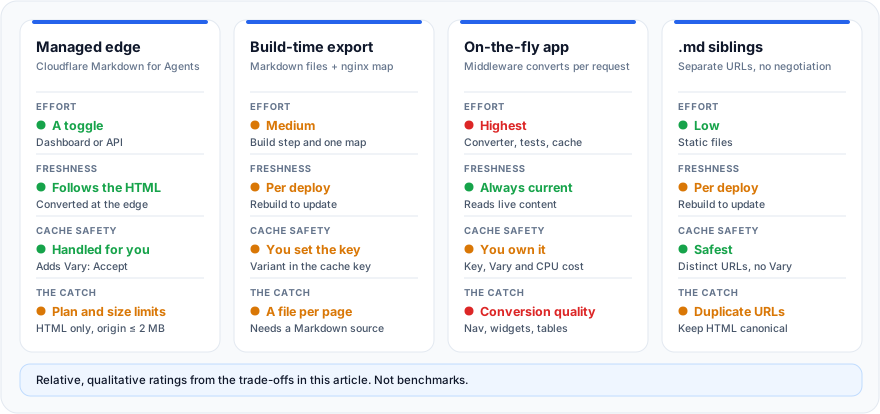
For a content site on your own server, that combination of build-time Markdown, nginx negotiation, and .md siblings is my default. The siblings are there so a client that never sends Accept: text/markdown can still fetch the file. The llms.txt proposal accepts page.md or page.html.md, and index.md or index.html.md for directory URLs (llmstxt.org). aiSiteReady's fallback probe makes one request: page.md for a page URL, index.html.md for a directory URL.
How does aiSiteReady's Markdown check score a page?
aiSiteReady's markdown_negotiation check requests the page as an agent would and grades the answer as PASS, PARTIAL, FAIL, or UNKNOWN, with evidence. It has high severity and weight 2.0 within Content Accessibility, which is 25% of the score (40% under the Content site profile). It requests the canonical URL with Accept: text/markdown,*/*;q=0.1 through an SSRF-safe fetcher and runs no JavaScript. Only if that doesn't pass does it request an llms.txt-style .md URL.
- PASS:
Content-Typeis exactlytext/markdown, the body looks like Markdown, and there isVary: Acceptor an announcedLink: rel="alternate"; type="text/markdown". A sibling URL serving Markdown passes withoutVary. - PARTIAL: the deprecated
text/x-markdowntype, Markdown withoutVaryorLink, aLink: rel="alternate"; type="text/markdown"on a response that is not Markdown (the scanner doesn't fetch the link target), or HTML withVary: Accept. Any other Markdown signal, such as a Markdown-looking body under another type, is PARTIAL too. - FAIL: no Markdown signal in either response, or a non-2xx answer. A 403 or 429 is UNKNOWN instead, because a bot block is not a verdict; so are timeouts and bodies over 2 MB.
"Looks like Markdown" means at least two signals (a heading, a link, a list, a code fence, no HTML tags) and at most three HTML tags (up to a quarter of the lines when served as text/markdown).
That bit us: once our blog served text/markdown, one technical article scored as not-Markdown because of 32 tag-like strings, all inside code samples. A scanner fix the same evening, 13 June 2026, made it ignore tags inside fenced and inline code; tags in prose still count.
The exact weights are on the methodology page; the Markdown check sits beside llms.txt in the content-accessibility layer of what AI agent readiness means. Run a free scan to see whether your server returns real Markdown for Accept: text/markdown, which header is missing if it doesn't, and what to fix first, in English, Ukrainian, or Russian.
The short version: self-hosting Markdown for agents is three jobs, not a platform. Choose the variant from a q-aware reading of Accept, produce the Markdown from the source you already have, and make every cache between you and the agent aware that one URL has two representations.
IMozz has 20 years in software development, with the past year spent building with LLMs. He builds aiSiteReady, a read-only scanner that checks whether AI agents can read a site. It server-renders its own content as a working example.