Agentic commerce checklist for online stores: UCP and ACP
Agentic commerce checklist: the 8 layers AI shopping agents need from an online store, from Product JSON-LD and feeds to UCP and ACP, each with a curl check.
An agentic commerce checklist for an online store has eight layers, from crawlable product pages to a checkout API an agent can call, and the first two, plus a Merchant Center feed, are plain engineering you can finish and verify this week. The later layers depend on which AI surfaces you sell through, and Google and OpenAI both gate parts of them behind an approval.
This is the commerce floor of the readiness stack. An agent first has to read a product page without running JavaScript (JavaScript sites), and your markup sits on top (structured data). A store adds product data, discovery documents such as /.well-known/ucp, and checkout. Support is uneven: Google's UCP guide says not every spec feature is available on its surfaces (Google). See what AI agent readiness means for the wider picture.
Key takeaways
- Shopping agents read your pages, your product data and, where you are approved, a checkout API. OpenAI says ChatGPT weighs structured product metadata when choosing results (OpenAI Help).
- UCP and ACP are separate specs. UCP (Shopify and Google) lives at
/.well-known/ucp, latest release v2026-08-25 (UCP). ACP (OpenAI and Stripe) is in beta, latest release 2026-04-17 (ACP).- Going live is gated: Google must approve a UCP integration, and merchants apply to OpenAI before their feed reaches ChatGPT (Google, OpenAI).
- An ACP feed is pushed over SFTP or an API, not crawled, so publish Product JSON-LD either way (OpenAI).
- User-triggered agents such as
ChatGPT-UserandGoogle-Agentcan ignorerobots.txt, so check your WAF. aiSiteReady runs three commerce checks and scores your store 0–100.
What does an AI shopping agent need from your store?
Three things, in order: pages it can read, product data it can trust, and, if you want it to buy, a surface it can call. The first two are fully in your hands today; the third usually waits on a platform's approval.
OpenAI says you don't need a feed if ChatGPT already crawls your site, and that purchases are completed on merchant-owned sites or apps (OpenAI). Google's route starts with Merchant Center shipping, returns and the product feed, before any API (Google). Here are the eight layers, each with the signal that says it is done.
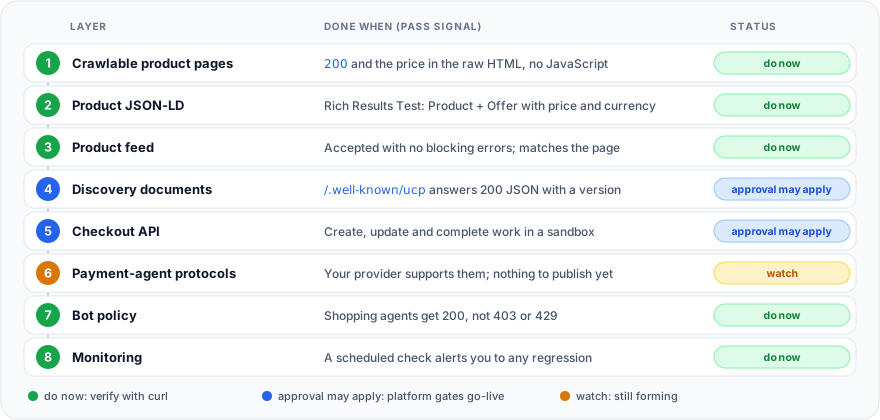
Layers 1, 2, 3, 7 and 8 are ordinary engineering. Layers 4 and 5 are published specs, but Google and OpenAI gate going live. Layer 6 depends mostly on your payment provider and is still forming.
UCP vs ACP vs AP2 vs x402: which layer does what?
They sit at different layers, so they are not simple rivals. UCP and ACP both cover discovery and checkout, AP2 covers how a payment is authorized, and x402 covers pay-per-request access over HTTP.
| Layer | Who backs it | What you publish | Where agents find it | Maturity, Oct 2026 |
|---|---|---|---|---|
| Product JSON-LD | schema.org; rules by Google | Product and Offer in the page HTML | The product page | Stable |
| Merchant Center feed | Feed with id, price, availability | You upload it | Stable; needed for Google's UCP checkout | |
| UCP | Shopify and Google; Stripe on the council | Profile, plus checkout and catalog endpoints | /.well-known/ucp | Latest v2026-08-25; Google go-live needs approval |
| ACP | OpenAI and Stripe | Pushed feed, checkout endpoints, optional discovery file | Feed: apply and push. File: /.well-known/acp.json | Beta, 2026-04-17; feed by application |
| AP2 | Google; FIDO groups standardize | Signed checkout state and mandate checks | Declared in the UCP profile | v0.2.0, April 2026 |
| x402 | x402 Foundation | HTTP 402 with PAYMENT-REQUIRED | The 402 response | Says production-ready; per-request payments |
UCP, the Universal Commerce Protocol, is a profile-and-capabilities model: agents fetch your profile and negotiate which capabilities (checkout, catalog, cart, order) both sides support (UCP spec). Shopify and Google co-developed it (Shopify Engineering), and Stripe now sits on its governing council (UCP announcements). ACP, the Agentic Commerce Protocol, is a set of specs for checkout, delegated payment and product feeds; OpenAI says that in ChatGPT today it supports product discovery through shared product data (OpenAI). The practical difference: UCP is pulled from your origin, an ACP feed is pushed to a platform.
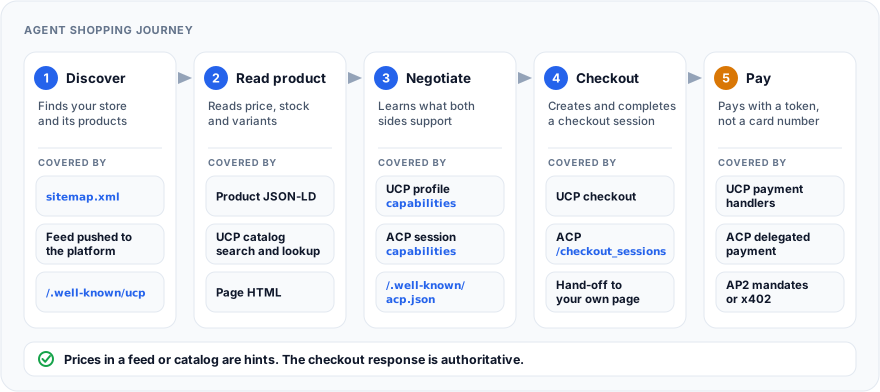
Layer 6, payments. AP2, the Agent Payments Protocol published by Google, defines signed mandates that prove what a user authorized: a checkout mandate for the merchant and a payment mandate for the payment side. It extends A2A and UCP, and FIDO Alliance working groups continue its standardization (AP2). In UCP it is an optional checkout extension (UCP and AP2). Its latest release is v0.2.0 (AP2 releases).
x402 is different: a server answers HTTP 402 with a PAYMENT-REQUIRED header, and the client pays and retries. It prices one resource request, so it fits APIs and paywalled content more naturally than a cart with shipping and tax (x402). For most stores both AP2 and x402 are layers to watch, not build.
How do you make product pages readable to agents?
Start with the page, because every other layer points back to it. Layer 1: each product, or each variant with its own URL, needs a stable, crawlable page that carries the price in the raw HTML. Google's merchant listing rules set the floor (Google merchant listings):
- Only pages where a shopper can buy qualify.
- The page must not sit behind
robots.txt,noindexor a login. - Product markup belongs in the initial HTML, because JavaScript-generated markup can make Shopping crawls less frequent and less reliable for fast-changing price and availability.
- Several currencies need one URL per currency.
An app that paints the price after load fails this layer for any agent that doesn't run JavaScript; making a JavaScript site readable to AI covers the fixes.
Layer 2: Product JSON-LD that matches the page. Google requires name, image and offers, and the Offer needs a price above zero and a priceCurrency. It recommends availability, brand, GTIN or MPN, itemCondition, and shipping and return details, preferably as one global policy under Organization markup that an offer references by @id (Google merchant listings).
<script type="application/ld+json">
{
  "@context": "https://schema.org/",
  "@type": "Product",
  "name": "Trail running shoes, black",
  "image": [
    "https://shop.example.com/img/trail-black-1x1.jpg",
    "https://shop.example.com/img/trail-black-4x3.jpg"
  ],
  "description": "Waterproof trail shoes with a rubber outsole.",
  "sku": "TRAIL-BLK-10",
  "gtin14": "00012345600012",
  "brand": { "@type": "Brand", "name": "Northline" },
  "offers": {
    "@type": "Offer",
    "url": "https://shop.example.com/products/trail-black",
    "priceCurrency": "USD",
    "price": 79.99,
    "availability": "https://schema.org/InStock",
    "itemCondition": "https://schema.org/NewCondition",
    "hasMerchantReturnPolicy": { "@id": "https://shop.example.com/returns#policy" },
    "shippingDetails": {
      "@type": "OfferShippingDetails",
      "hasShippingService": { "@id": "https://shop.example.com/shipping#policy" }
    }
  }
}
</script>
Three details trip people up. Use the full schema.org URL for availability; Google also accepts short names, but the URL is unambiguous. Submit a GTIN only if you are sure it is right, because Merchant Center disapproves products with a wrong one. And keep the markup equal to the visible price and to your feed, since Google lists feed-versus-site conflicts among common product issues (Merchant Center).
Done looks like this: one Product in the raw HTML whose Offer has price and currency, a valid merchant listing in the Rich Results Test, and values that match what a shopper sees.
How do you publish product data agents can ingest?
Layer 3 is a product feed: a file or API you push to each platform, not something agents crawl. The two that matter work differently.
Google takes a feed in Merchant Center as a text file, XML or through the Merchant API. Its specification marks id, title, description, link, image_link, availability and price as required, and recommends a GTIN (Merchant Center). Google's UCP checkout builds on that feed: you opt products in with the native_commerce attribute, and the feed id must match your checkout API's item id, or you map it with merchant_item_id (Google).
OpenAI takes a file over SFTP (Parquet preferred; jsonl.gz, csv.gz and tsv.gz also work) as a full snapshot at least daily, or an API with Feeds, Products and Promotions endpoints for incremental upserts (OpenAI, Get started). Nine fields are required per item (OpenAI).
{"item_id":"TRAIL-BLK-10","title":"Trail running shoes, black, size 10","description":"Waterproof trail shoes with a rubber outsole.","url":"https://shop.example.com/products/trail-black?size=10","brand":"Northline","seller_name":"Northline Outdoor","image_url":"https://shop.example.com/img/trail-black-1x1.jpg","availability":"in_stock","price":"79.99 USD"}
Merchants apply to share a feed, and OpenAI plans a self-serve portal by the end of 2026. Shopping is live for U.S. users, and Shopify and Etsy catalogs are already integrated (OpenAI). The ACP repository calls its Feed API a push model: merchants send catalog data to the agent, and agents don't pull it (ACP changelog). UCP has no feed; your server answers its catalog capability (search and lookup) live, and checkout stays authoritative (UCP).
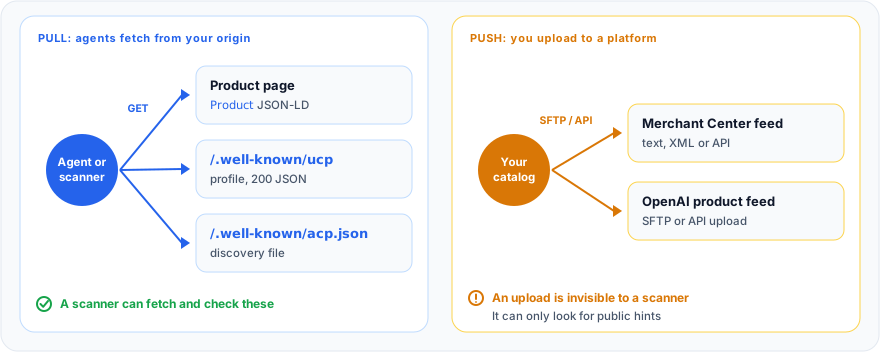
Done looks like this: no blocking errors, and a twenty-SKU spot check shows the same price, availability and URL in the feed and in the JSON-LD.
What do discovery documents and checkout endpoints look like?
Layer 4 is a small JSON file at a well-known URL that says which protocol you speak and where the API lives; layer 5 is the API. Publish the file only if the API behind it exists, because agents act on what it promises.
UCP's file is /.well-known/ucp. Required members are ucp.version, ucp.services and ucp.payment_handlers (the registries must exist even when empty) (UCP spec). It must be served over HTTPS without redirects, with Cache-Control: public and a max-age of at least 60 seconds (UCP hosting rules). Google adds that it must be public, with no authentication (Google). A trimmed profile:
{
  "ucp": {
    "version": "2026-08-25",
    "services": {
      "dev.ucp.shopping": [
        {
          "version": "2026-08-25",
          "spec": "https://ucp.dev/2026-08-25/specification/overview/",
          "transport": "rest",
          "endpoint": "https://shop.example.com/ucp/v1",
          "schema": "https://ucp.dev/2026-08-25/services/shopping/rest.openapi.json"
        }
      ]
    },
    "capabilities": {
      "dev.ucp.shopping.checkout": [
        {
          "version": "2026-08-25",
          "spec": "https://ucp.dev/2026-08-25/specification/shopping/checkout",
          "schema": "https://ucp.dev/2026-08-25/schemas/shopping/checkout.json"
        }
      ]
    },
    "payment_handlers": {}
  }
}
Fill payment_handlers from your payment provider's handler spec; how to publish /.well-known/ucp covers every member.
ACP's file is /.well-known/acp.json. It is in the 2026-04-17 changelog and JSON schema, though the RFC text still calls itself a proposal. It needs no authentication, should be cacheable, and a 404 means no ACP (ACP RFC).
{
  "protocol": {
    "name": "acp",
    "version": "2026-04-17",
    "supported_versions": ["2026-04-17"]
  },
  "api_base_url": "https://shop.example.com/acp/v1",
  "transports": ["rest"],
  "capabilities": { "services": ["checkout"] }
}
One caveat if you scan this file: as of October 2026 aiSiteReady's probe still expects protocol as a plain string, so it reports this spec-shaped document as missing fields (see the scanner limits at the end).
Both are static files, so the web server can serve them directly.
location = /.well-known/ucp {
    alias /var/www/well-known/ucp.json;
    default_type application/json;
    add_header Cache-Control "public, max-age=3600" always;
    add_header Access-Control-Allow-Origin "*" always;  # our check looks for it; the spec does not require it
}

location = /.well-known/acp.json {
    alias /var/www/well-known/acp.json;
    default_type application/json;
    add_header Cache-Control "public, max-age=3600" always;
}
Layer 5 follows one pattern in both protocols: create, update and complete a checkout session. UCP adds a state machine and a continue_url that hands the buyer to your page when the agent cannot finish (Shopify Engineering). ACP's checkout spec documents five endpoints over HTTPS, with create, update and complete as the required core, plus order webhooks (OpenAI). Google asks for three core REST endpoints (Google).
Both platforms gate checkout. Google asks you to join a waitlist and says your integration must be approved before it goes live in AI Mode in Google Search and in Gemini (Google UCP overview). OpenAI says the first version of Instant Checkout lacked the flexibility it wanted, so merchants now use their own checkout while it focuses on product discovery (OpenAI, March 2026); its checkout spec is still published. So build layer 5 when a surface you really sell through asks for it, and check what your hosted platform already handles.
Agents that drive your page instead of an API work from screenshots, raw HTML and the accessibility tree (web.dev), so a real button with a clear name still matters.
How do you keep shopping agents from being blocked?
Layer 7: agent traffic must get a 200 on product, cart and API paths, and for user-triggered agents the gatekeeper is your WAF, because robots.txt may not apply. OpenAI lists OAI-SearchBot for search, GPTBot for training and ChatGPT-User for actions a person triggers, where robots.txt rules may not apply (OpenAI). Google documents Google-Agent for agents that browse and act on a user's request, and says user-triggered fetchers generally ignore robots.txt (Google). The syntax for the first two jobs is in control AI crawlers in robots.txt.
Google's UCP FAQ gives you markers for the third job: a UCP-Agent header, a User-Agent starting with Google/UCP, and health probes as Google-UCP-Prober/1.0. User agents can be spoofed, so verify against published IP ranges and authenticate with tokens rather than geo-blocking (Google). Challenge pages and blanket per-IP rate limits can break an agent mid-checkout, so check what your server answered.
grep -E 'ChatGPT-User|OAI-SearchBot|Google-Agent|Google/UCP' /var/log/nginx/access.log \
  | awk '{print $9}' | sort | uniq -c | sort -rn
Example output:
  412 200
   37 304
    9 403
Any 403 or 429 deserves a look. aiSiteReady's Bot Governance check reads robots.txt and cannot see WAF behavior. If your WAF blocks the scanner itself with a 403 or 429 on the page, the commerce checks report unknown instead of fail, which still scores zero; a WAF that blocks only the /.well-known/ paths reads as no document at all.
How do you verify each layer, and keep it verified?
Run a few curl commands against the public URL, then put them on a schedule; that is all layer 8 is. Use the edge URL, not localhost, because most breakage lives in templates, CDNs and WAF rules.
SHOP=https://shop.example.com

# Layer 2: how many JSON-LD blocks are in the raw HTML (no JavaScript runs)?
curl -sSL "$SHOP/products/trail-black" | grep -c 'application/ld+json'

# Layer 4: status, type and CORS header of the discovery document
curl -sSI "$SHOP/.well-known/ucp" | grep -iE '^(HTTP|content-type|access-control)'

# Layer 4: what the document declares
curl -sS "$SHOP/.well-known/ucp" | python3 -c 'import sys, json; u = json.load(sys.stdin)["ucp"]; print(u["version"], list(u["services"]), list(u.get("capabilities", {})))'
Example output from a store that publishes UCP:
1
HTTP/2 200
content-type: application/json
access-control-allow-origin: *
2026-08-25 ['dev.ucp.shopping'] ['dev.ucp.shopping.checkout']
The first number should be above zero, and a 404 on /.well-known/acp.json is fine if you don't run ACP. This script runs the same checks and exits non-zero on a failure, so cron or CI can alert on it.
#!/usr/bin/env bash
# usage: check-store.sh https://shop.example.com /products/trail-black
set -u
SHOP="${1:?usage: check-store.sh https://shop.example.com /products/sku}"
PRODUCT="$SHOP${2:?product path}"
rc=0
pass() { echo "OK    $1"; }
fail() { echo "FAIL  $1"; rc=1; }
skip() { echo "SKIP  $1"; }

# Layers 1-2: price and currency in server-rendered JSON-LD
if curl -fsSL "$PRODUCT" | python3 -c '
import sys, re, json
def as_list(value):
    return value if isinstance(value, list) else [value]
def nodes(data):  # walks @graph, arrays and ProductGroup variants
    for item in as_list(data):
        if isinstance(item, dict):
            yield item
            for key in ("@graph", "hasVariant"):
                yield from nodes(item.get(key, []))
def priced(offer):  # an Offer, or an AggregateOffer that wraps one
    if not isinstance(offer, dict):
        return False
    if offer.get("price") and offer.get("priceCurrency"):
        return True
    return any(priced(inner) for inner in as_list(offer.get("offers", [])))
html = sys.stdin.read()
for block in re.findall(r"<script[^>]*application/ld\+json[^>]*>(.*?)</script>", html, re.S):
    try:
        data = json.loads(block)
    except ValueError:
        continue
    for node in nodes(data):
        if "Product" in as_list(node.get("@type")) and any(priced(o) for o in as_list(node.get("offers", []))):
            sys.exit(0)
sys.exit(1)'; then
  pass "Product + Offer with price and priceCurrency in the raw HTML"
else
  fail "no Product + Offer with price and priceCurrency in the raw HTML"
fi

# Layer 4: discovery documents (404 means "not adopted", not a failure)
for path in .well-known/ucp .well-known/acp.json; do
  read -r code ctype < <(curl -sS -o /dev/null -w '%{http_code} %{content_type}\n' "$SHOP/$path")
  if [ "$code" = "404" ]; then
    skip "/$path is not published"
  elif [ "$code" = "200" ] && [[ "$ctype" == application/json* || "$ctype" == *+json* ]]; then
    pass "/$path answers 200 with JSON"
  else
    fail "/$path answered $code ($ctype)"
  fi
done
exit $rc
I ran these checks on 2 October 2026 against one product page from each of 15 well-known online stores. I fetched the raw HTML from a browser session, because several storefronts throttle plain curl from my connection. Twelve pages carried a Product with a priced Offer in server-rendered JSON-LD. The other three had no Product node at all, and one of them served no JSON-LD. One page passed only because its price sat in an Offer inside an AggregateOffer, which is why the script walks nested offers.
The discovery files split along platform lines. Five stores answered /.well-known/ucp with JSON, all of them on Shopify's hosted storefront; two Shopify-backed stores with a custom front end returned 404. None served an acp.json. One store answered both paths with a 200 HTML page, the catch-all response the content-type test exists to catch.
Run it after every theme or plugin deploy, because markup lives in templates and a change can drop it without any visible difference. On Google's side, the Rich Results Test and the Merchant Center diagnostics are the validators. For the layers outside commerce, the 30-minute AI agent readiness audit works the same way.
The printable agentic commerce checklist
- Layer 1: product pages return 200 with title, price and availability in the raw HTML, one URL per variant and currency.
- Layer 2:
ProductJSON-LD withname,imageand anOfferthat hasprice,priceCurrencyand a schema.orgavailabilityURL. - Layer 2: a valid GTIN or none; shipping and returns referenced from
Organizationmarkup. - Layer 3: feed accepted by Merchant Center, and by OpenAI once your application goes through, without blocking errors.
- Layer 3: price, availability and URL match between feed and JSON-LD on a twenty-SKU spot check.
- Layer 4:
/.well-known/ucpis public JSON and lists only what you serve;/.well-known/acp.jsonexists only if the ACP API does. - Layer 5: checkout create, update and complete work in a sandbox.
- Layer 6: payment handlers match your provider; AP2 and x402 stay on the watch list.
- Layer 7: logs show 200, not 403 or 429, for the shopping-agent user agents.
- Layer 8: the curl script runs on a schedule and after every deploy, with an alert.
How do you scan a whole store for agentic commerce readiness?
Hand-checking one product page is fine; checking every template after every theme change is not. aiSiteReady fetches your page the way an agent would, through a read-only, SSRF-safe fetcher that runs no JavaScript, and its Commerce category has three checks. The E-commerce profile doubles that category's weight, and the Content site and API/Application profiles skip it. Elsewhere, on a site with no commerce signals at all, Product structured data and Agentic commerce signals report N/A instead of a failure, while Product feed hints still fails. The exact weights live on the methodology page.
| Check | Reads | Passes when | Otherwise |
|---|---|---|---|
| Product structured data | JSON-LD, microdata, RDFa on the scanned URL | A Product has an Offer with price and priceCurrency | PARTIAL: no Offer, no price or currency, an AggregateRating alone, or any broken JSON-LD block. FAIL: nothing, or an Offer outside a Product |
| Product feed hints | Link header and link, a, meta tags; /.well-known/ucp | A product-feed hint, or a discovery signal such as a valid UCP file | PARTIAL: only generic feeds such as RSS, or malformed Link entries. FAIL: none |
| Agentic commerce signals | The page, /.well-known/acp.json, /.well-known/ucp | A valid ACP or UCP document, a link or tag that names a protocol, or structural x402 | PARTIAL: UCP without CORS, only a local payment adapter, a bare 402, payment headers or rel=checkout links. FAIL: none |
Four limits to know before you trust a green result:
- One URL. Scan a product page, not the homepage; homepages rarely carry full Product and Offer markup.
- Published, not working. It never calls your checkout endpoints,
api_base_urlor feed URLs. A UCP file behind a redirect still passes, although the spec forbids redirects there, and a link that only names a protocol passes without the file behind it being fetched. - No pushed feeds. It finds links and metadata, not uploads, and a bare
llms.txtlink in the HTML counts as a discovery signal, which is generous. - Two rules are stricter than the specs. As of October 2026 the ACP probe expects
protocolas a plain string, while the 2026-04-17 schema makes it an object, so a spec-shaped file is reported as missing fields. A UCP profile withoutAccess-Control-Allow-Originis only PARTIAL when it is the only protocol signal, though the UCP spec does not mention CORS; that rule is ours.
Run a free scan with the E-commerce profile on a product page to see which layers an agent finds, in English, Ukrainian, or Russian. Related guides: structured data for AI agents, how to publish /.well-known/ucp and AI crawler rules in robots.txt.
The short version: make the product page readable and honest first, publish the same facts as a feed, and only then add discovery documents and a checkout API for the surfaces that approve you. Keep agents unblocked, and re-run the curl checks after every deploy.
IMozz has 20 years in software development, with the past year spent building with LLMs. He builds aiSiteReady, a read-only scanner that checks whether AI agents can read a site. It server-renders its own content as a working example.